Objective comparison

Screen Studio Alternative for Mac: Oil Studio vs Screen Studio (2026)

An objective 2026 1v1 comparison of Oil Studio vs Screen Studio for Mac: compare 3-year ownership cost, offline Whisper word cuts, Claude Code / Codex CLI automation, read-only project import, and Intel / iOS boundaries.

Verified November 2026 · Native macOS 15 UI captures & public vendor pricing

10-second executive scorecard
License & post-cancel exports
Oil StudioOne-time purchase (2 Macs), export forever
Screen Studio$108/yr or $29/mo subscription required to export
3-year ownership cost
Oil Studio$39 offer / $49 regular ($0 in years 2–3)
Screen Studio$324 billed annually ($9/mo × 36 mos)
Click auto-zoom & cursor physics
Oil StudioSpring zoom, cursor redraw & 180° motion blur
Screen StudioAuto zoom, cursor smoothing & motion blur
Voice-over word cuts & pause cleanup
Oil StudioOffline Whisper word-delete cuts + 150 ms Keep Breath
Screen StudioTimeline-centric trimming; not a word-level editor
Legacy Intel, iOS USB & cloud links
Oil StudioApple silicon macOS 15+ only · Local MP4/GIF/SRT
Screen StudiomacOS 13.1+, Intel Macs, USB iOS & hosted links

Quick decision rule: choose Oil Studio on Apple silicon Macs (macOS 15+) if you want a one-time license uniting click auto-zoom, offline Whisper word cuts, and a Claude Code / Codex CLI; stay with Screen Studio if you rely on Intel Macs, macOS 13–14, USB iPhone/iPad capture, or instant hosted share links.

When Oil Studio fits better

  • You want a true one-time purchase:Pay once for 2 Macs with permanent local export access and $0 in ongoing AI credit meters.
  • You record narrated walkthroughs:Run Whisper offline on Apple silicon, cut video by deleting words or sentences, tighten pauses with 150 ms Keep Breath, and strip filler words.
  • You build with Claude Code or Codex:Let your coding agent inspect transcripts and click telemetry to submit reviewable AI Edit proposals, or record Mac demos via the oilstudio CLI.
  • You have existing projects & privacy requirements:Import existing recording projects strictly read-only without modifying originals, and pixelate secrets before zoom magnification.

When Screen Studio fits better

  • You work on an Intel Mac or macOS 13–14:Screen Studio supports macOS Ventura 13.1+ and select 2018+ Intel Macs, whereas Oil Studio requires macOS 15+ on Apple silicon.
  • You record iPhone or iPad screens over USB:Screen Studio captures connected iOS/iPadOS devices directly into mobile device frames.
  • You rely on hosted cloud share links:If your workflow centers on copying a hosted web player URL right after capture rather than exporting local MP4 files.
  • You already hold an active annual plan:If you record short silent clips without voice-over retakes or CLI automation during an existing billing cycle.
Capability deep-dives

4 architectural differences that show up after you hit Stop

Both apps nail spring-smoothed click zooms during capture. Where your weekly hours and budget diverge is everything that happens between stopping a 5-minute take and shipping the final MP4:

01Post-capture voice-over editing

Scrubbing waveforms manually vs deleting words on word boundaries

In narrated tutorials, 80% of editing time goes to cutting false starts, stumbles, and dead air.

How Oil Studio works

Runs hardware-accelerated Whisper offline on your Mac with zero upload wait. Select a flubbed sentence and press ⌘⌫ to cut screen video, mic audio, and spring zoom blocks together, or click Remove Pauses (150 ms Keep Breath default). Crucially, Oil Studio flags any silence range containing mouse clicks, keystrokes, or UI changes so active silent steps are never cut by mistake.

How competitor works

Built primarily around timeline clip trimming and speed ramps. Great for 20-second silent UI showcases, but tightening a 10-minute narrated walkthrough still means hunting waveforms by ear or round-tripping into an external transcript editor.

Bottom line:If you speak on mic in your demos, integrated offline word-boundary cutting saves 20–30 minutes per video.
02Developer & agent automation

GUI-only editing vs the oilstudio CLI for Claude Code & Codex

Product videos go stale fast when every UI tweak requires manual re-recording and re-cutting.

How Oil Studio works

Ships with the local oilstudio CLI and open-source Agent Skill. Ask Claude Code or Codex to remove spoken retakes and fix product terms in captions: the agent validates word timestamps and submits a reviewable proposal inside the app (with one-keystroke ⌘Z undo). With permission, agents can even drive a target Mac window, log synthetic clicks for smooth spring zooms, strip idle waits, and export 60 fps MP4.

How competitor works

Designed purely around manual GUI recording and timeline editing, with no local CLI protocol or coding-agent proposal workflow.

Bottom line:Teams living in Claude Code or Codex can turn changelog and docs video updates into repeatable agent tasks.

03Privacy redaction order

Redacting raw screen textures before zoom magnification & AI sampling

Where pixelation sits in the render pipeline determines whether secrets stay hidden.

How Oil Studio works

Applies pixelation and blur directly to the underlying raw screen texture before camera zoom magnification and before any AI agent frame sampling. Masks stay mathematically locked to UI coordinates as the camera zooms in and out, and external agents only ever receive pre-redacted frames.

How competitor works

Provides timeline mask overlays for hiding sensitive regions in exported videos, without a local AI pre-redaction pipeline.

Bottom line:Recording live terminals, Stripe dashboards, or customer environments is safer when redaction happens at the base texture.

04Migration & hardware scope

Read-only project import vs Intel Mac, USB iOS & cloud links

Zero-risk migration and local file ownership on one side; broader OS and iOS hardware support on the other.

How Oil Studio works

Imports supported existing recording projects strictly read-only in seconds — preserving original footage, cursor paths, click timestamps, and zoom blocks without mutating source folders or doubling disk usage. Requires macOS 15+ on Apple silicon.

How competitor works

Runs on macOS 13.1+ including select 2018+ Intel Macs, captures connected iPhone and iPad screens over USB, and generates hosted cloud share links out of the box.

Bottom line:Apple silicon Macs on macOS 15+ can migrate existing projects read-only and buy once; Intel Mac, iOS USB, or cloud-link users should stay on Screen Studio.

Ownership ledger

3-year ownership cost & licensing breakdown

Calculated for 1 creator working across 2 Macs (e.g., MacBook Pro + Mac Studio) over 36 months

Verify on Screen Studio official pricing ↗
Oil StudioBlack Friday · 20% off

Pay $39 once ($49 regular) · No subscription renewal

Year 1 spend$39
3-year total$39
  • 1 license activates 2 Macs (inactive Macs auto-release after 30 days)
  • $0 ongoing fees for on-device Whisper captions, Voice Enhancement & Agent CLI
Screen StudioPublished pricing

Public subscription: $9/mo billed annually ($108/yr) or $29/mo monthly

Year 1 spend$108
3-year total$324
  • Active subscription required to keep exporting new videos
  • Hosted share links and updates included while subscribed
36-month cumulative spend visual scale (2 Macs)Save ~85%–88% over 3 years while keeping permanent export access to every project
Oil Studio$39 · $0 in years 2 & 3
Screen Studio$324 · Based on $108/yr annual billing × 3 years ($348 in year 1 alone if billed monthly at $29/mo)

Methodology: Without launch discounts, Oil Studio caps at $49 regular once; Screen Studio figures reflect the lowest published annual billing tier verified in November 2026.

First-hand evidence

Native macOS 15 UI captures, live Agent proposal sandbox & Apple silicon specs

Real macOS 15 interface captures and an interactive browser sandbox you can test right now without downloading:

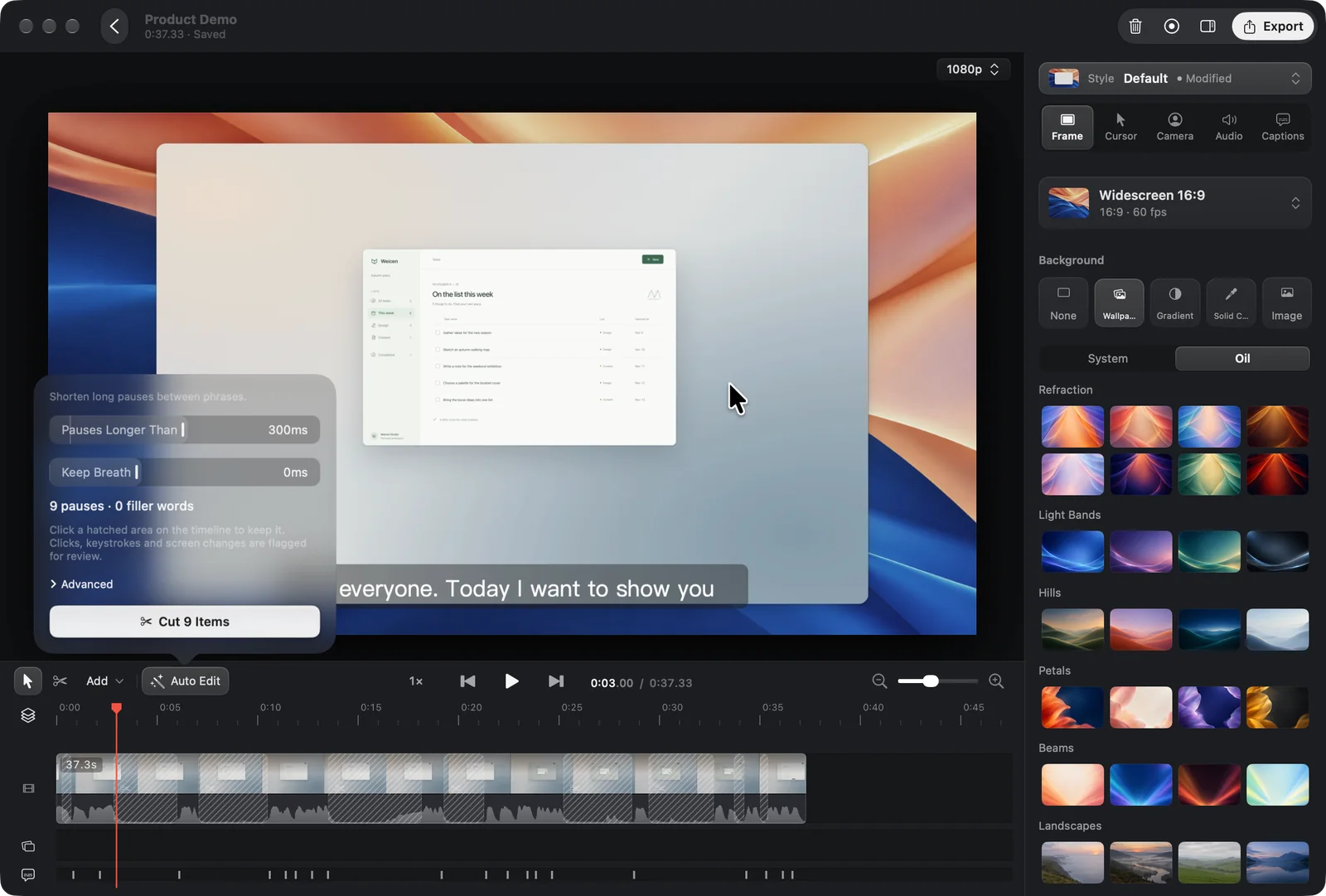
Real Oil Studio macOS 15 editor window showing 9 hatched pause ranges on the timeline alongside the 56-wallpaper Frame inspector
Captured directly on macOS 15: Oil Studio marks 9 detected silence ranges on the timeline (click any hatched region to keep it) while framing the window over 56 built-in wallpapers.
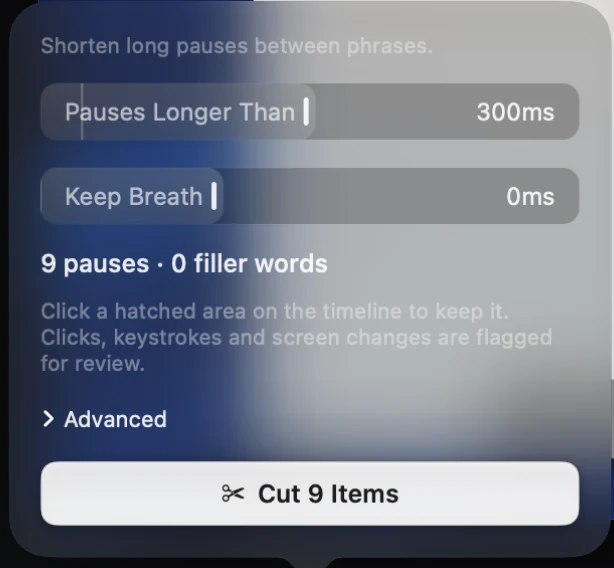
1:1 Retina close-up of Oil Studio's Remove Pauses popover showing Pauses Longer Than 300ms, Keep Breath, and Cut 9 Items
1:1 Retina close-up of Remove Pauses: dial in the silence threshold and Keep Breath duration; ranges containing clicks, keystrokes, or screen changes are automatically flagged so active steps are never cut by accident.
Interactive · No download needed

Try it live: apply a Claude Code / Codex fine-cut proposal

Click any item in the proposal card or press Apply on the right to see how tightening pauses and cutting retakes automatically shifts the 1.5× and 1.3× zoom blocks underneath:

“Cut the retakes and slips from the demo I just recorded, and fix the product names in the captions”
AI fine cut · 12 items
Retake“Then type a name and hit sa, wait, let me say that again”3.6 s
Slip“drag this task to, to Done”1.2 s
Filler“um, how do I put it, like”2.1 s
Saves 48 s · one-step undo

Apple silicon engine & license baseline

Platform: Apple silicon (M-series) · macOS 15+ · Native Swift + Metal
~5×
1080p60 hardware export speed

Hardware-accelerated H.264 / HEVC on M-series chips (~1.5× realtime at 4K60); exports MP4, GIF, and standalone SRT subtitles.

150 ms
Default Keep Breath on pause cuts

Cuts silence and filler words cleanly on word boundaries without clipping syllables; click any hatched timeline region to keep it.

≤ 1 GB
15-minute timeline memory budget

Holds full Whisper captions, waveforms, and filmstrip thumbnails within 1 GB without creeping up over long editing sessions.

2 Macs
One-time license ($0 AI credit fees)

Activates 2 Macs per license (inactive seats auto-release after 30 days), with $0 fees for local Whisper or your own Claude Code / Codex.

Specification matrix

20-point architecture, workflow & licensing matrix

✓ Built in / unrestricted◐ Conditional / different scope— Outside product scope

1. Licensing, seats & long-term cost

SpecificationOil StudioScreen Studio
Pricing model & renewal obligation
✓One-time purchase (no recurring subscription)
◐Subscription ($108/yr annual or $29/mo monthly)
Can you export new videos without an active subscription?
✓Yes — permanent local export after one-time activation
—No — active subscription required to export videos
Included Mac activations per license
✓2 Macs simultaneously (inactive seats auto-release after 30d)
✓Managed per subscribed user seat
Ongoing fees for captions, voice cleanup, or AI agent cuts
✓$0 (runs offline on-device + BYO Claude Code / Codex)
◐Captions included while subscribed; no local coding-agent CLI

2. OS support, screen capture & camera physics

SpecificationOil StudioScreen Studio
Operating system & processor support
◐macOS 15+ · Apple silicon only (M1 or newer)
✓macOS 13.1+ · Apple silicon & select 2018+ Intel Macs
Auto zoom on clicks, spring-smoothed cursor & 180° motion blur
✓Built in (Swift + Metal pipeline, ~5× realtime 1080p60 export)
✓Built in (auto zoom, cursor smoothing & motion blur)
Display, window, region & split mic / system audio capture
✓Built in, with pause-resume & instant ⌥ original-audio A/B preview
✓Built in, multi-track screen, webcam, mic & system audio
iPhone & iPad recording over USB
—Not supported
✓Built in over USB cable
Show Shortcuts overlay (including modifier-only holds)
✓Built in, including ⌘ / ⌥ / ⇧ drag modifiers
✓Built in keystroke overlay
Camera layouts, background cutout, Skin Smoothing & tracked avatar
✓Overlay, Side by Side, fullscreen, auto-dodge, cutout, smoothing & avatar
◐Webcam framing & background removal; no tracked avatar

3. Offline captions, voice-over editing & audio

SpecificationOil StudioScreen Studio
Offline on-device Whisper speech recognition
✓Runs locally on Apple silicon; audio never leaves your Mac
◐Built-in captions; cloud workflows require connectivity
Edit video by deleting words or sentences in transcript
✓Built in — cuts land cleanly on word boundaries across video & zoom blocks
◐Timeline-driven trimming rather than word-level document cuts
Remove Pauses (150 ms Keep Breath) with click/keystroke protection
✓Built in, flagging any pause containing clicks, keystrokes, or UI changes
◐Basic silence trimming; no input-aware Keep Breath & filler inspector
Floating speech-following teleprompter (invisible to capture)
✓Built in next to camera notch; never appears in exported footage
—No built-in teleprompter
Multi-lane music with Lower While Speaking & Caption Narration
✓6 built-in tracks + custom audio, automatic ducking & BYO-key narration
—Basic volume controls; no built-in music library or synced narration

4. Privacy redaction, AI automation, migration & sharing

SpecificationOil StudioScreen Studio
Texture-level pixelation / blur prior to zoom & AI inspection
✓Redacts raw screen texture before zoom magnification or agent sampling
◐Timeline blur/mask overlays; no agent pre-redaction pipeline
Claude Code / Codex CLI proposals & autonomous capture
✓Built-in oilstudio CLI + open Agent Skill with human review before apply
—No CLI automation or external coding-agent integration
Read-only import of existing recording projects
✓APFS copy-on-write import preserves footage, cursor, clicks & zooms untouched
—Own project format only
Local export formats vs hosted shareable cloud links
◐Local MP4 (H.264 / HEVC), GIF & SRT export; no hosted cloud URLs
✓Local MP4 / GIF export plus hosted shareable cloud player links
Interface localization
✓Native English & Simplified Chinese UI
◐English UI
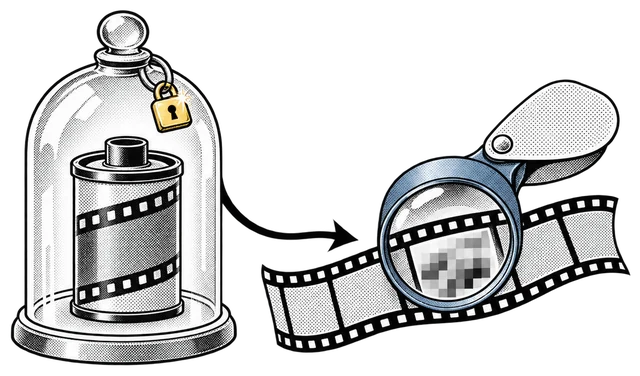
Read-only migration

How existing recording projects import without touching originals

Switching editors should not strand past recordings or risk mutating source bundles. Oil Studio imports supported existing projects strictly read-only using APFS copy-on-write cloning, creating an independent .oilstudio project in seconds without duplicating gigabytes of source video.

Original screen tracks, mic and system audio, cursor coordinates, click timestamps, and zoom blocks carry over intact — while zero settings or cache files are ever written back to the source folder.

Original film canister sealed safely under a glass bell jar while a clean cloned filmstrip branches out
01 · Pick an existing project

Choose Import Existing Project from the welcome window or File menu.

02 · Instant APFS clone

Oil Studio creates a standalone .oilstudio project preserving source media, cursor paths, clicks, and zoom blocks.

03 · Add Whisper cuts & agent polish

Run offline Whisper captions, tighten pauses, or ask Claude Code to propose fine cuts right away.

Editorial methodology

How we verify every claim on this page

This guide is published by the Oil Studio team. To make it genuinely useful as an engineering and buying reference rather than a one-sided pitch, we follow four strict rules:

Direct vendor pricing links:All 3-year TCO math uses published annual or one-time list prices from each vendor's official pricing page, linked inline so you can verify in one click.
1:1 Retina proof + live browser sandboxes:Every core Oil Studio workflow is shown with unretouched macOS 15 captures plus interactive demos you can test before downloading.
Explicit 'when NOT to pick us' callouts:We clearly flag Intel Macs, macOS 13–14, USB iOS recording, multi-guest podcasts, still screenshots, and hosted cloud links where other tools win.
Zero fabricated quotes or synthetic scores:We cite only verifiable architectural facts, hardware encoder baselines, and open-source CLI schemas.

Spot a vendor price or feature change? Email zhihuang.oiloil@gmail.com and we will verify and update this page within one business day.

Primary sources

Cited sources & public verification

Every pricing figure, OS requirement, and CLI capability on this page can be checked directly at the primary links below:

Common questions

Frequently asked questions

What is the best one-time purchase alternative to Screen Studio on Mac?
For Apple silicon Macs running macOS 15+, Oil Studio is the closest and deepest one-time purchase alternative — combining spring click auto-zoom, cursor smoothing, and 56 wallpapers with offline Whisper word-level video editing and a Claude Code / Codex CLI across 2 Macs. If you only need still screenshots and quick 15-second clips, CleanShot X is ideal; for free raw capture and live streaming, use OBS Studio.
Does importing an existing project modify my original files?
Never. Oil Studio's importer treats source bundles as strictly read-only and uses APFS copy-on-write into a new .oilstudio project. Your original projects remain untouched and openable in your previous tool.
Why does Oil Studio require macOS 15 and Apple silicon?
Targeting macOS 15 capture APIs and Apple silicon unified memory lets Oil Studio cap editing memory within 1 GB on 15-minute timelines, preview original footage at 60 fps with zero proxies, run Whisper locally, and export 1080p60 at roughly 5× realtime. If you work on an Intel Mac or macOS 13–14, Screen Studio is the right choice.
Are there extra AI credit fees for captions or Claude Code cuts?
No. Whisper speech recognition, Remove Pauses, Voice Enhancement, and Skin Smoothing run locally on your Mac for $0. Agent workflows use your own Claude Code or Codex setup with zero markup from Oil Studio.
Can I try Oil Studio before buying a license?
Yes. You can download Oil Studio free to test recording, automatic click zooms, offline Whisper captions, and timeline editing on your own Mac, then purchase a one-time activation code when you are ready to export.

Download free to record and edit — pay once only when you export.

Test capture, spring zoom, and timeline editing free on Apple silicon. One license covers 2 Macs with $0 ongoing AI credit fees.