Async team video links vs polished local product videos: compare Loom and Oil Studio across zoom craft, offline Whisper transcript cuts, local data privacy, and 3-year per-seat subscription costs.
Verified November 2026 · Includes native 4K60 Export UI captures & public tier rules
10-second executive scorecard
License & transcript-cut tier
Oil StudioOne-time purchase (2 Macs), word cuts included
LoomTranscript cuts require Business + AI ($240/user/yr)
3-year ownership cost
Oil Studio$39 offer / $49 regular ($0 in years 2–3)
LoomFlat screen capture inside hosted player chrome
Data residency & asset ownership
Oil Studio100% local files on disk; zero broken links ever
LoomUploaded to cloud workspace by default; seat-tied
1-second cloud URLs & thread comments
Oil StudioLocal MP4 / GIF / SRT studio; no hosted player
LoomWins: instant link copy, viewer stats & comments
Loom and Oil Studio are built for opposite ends of a video's lifespan. Loom is a cross-platform async messaging service: record a quick 2-minute status update and paste an instant cloud link into Slack or Linear with viewer reactions and timestamped comments. Oil Studio is a native Apple silicon production studio sold once: it turns raw screen captures into 60 fps MP4 demos with click-driven spring zoom, smoothed cursors, offline Whisper word cuts, clean leveled voice, and ducked background music — ready for your homepage, docs, changelog, or YouTube without third-party player chrome or per-seat monthly bills.
When Oil Studio fits better
The video represents your product publicly:Homepage heroes, release notes, onboarding docs, App Store previews, and social launches need crisp 1080p60/4K60 framing and automatic click zooms.
You want tight, stumble-free voice-over without AI seat add-ons:Transcript word cuts, 150 ms pause tightening, and filler cleanup are included out of the box via offline Whisper.
You require strict local privacy and file ownership:Proprietary code, terminals, and customer data never upload to a cloud workspace, and exported MP4 files live on your own CDN forever.
You want one predictable purchase instead of recurring seat fees:One license covers 2 Macs — a fraction of 3 years on per-user Business + AI plans.
L
When Loom fits better
You send disposable internal updates all day:Record a quick code walkthrough or design check-in and paste a hosted URL into Slack, Jira, or Notion immediately.
You need viewer analytics and timestamped thread comments:See who watched your clip and collect emoji reactions or inline comments at 0:42 in a browser.
Your organization spans Windows, Mac, Chrome, and mobile:Centralized team workspaces, SSO/SCIM provisioning, and browser-extension capture across every OS.
You never want to manage local MP4 files:Cloud hosting and link permissions are handled automatically per recording.
Capability deep-dives
Async status links vs evergreen product demos: 4 key differences
Unedited 'ums', unzoomed 5K desktop text, and third-party player chrome are fine for a Tuesday standup update — and costly on your marketing homepage or customer docs:
01First-impression craft
Third-party web player chrome vs clean 60 fps spring-zoomed MP4
Public product videos earn trust when every button click is legible and framed cleanly.
How Oil Studio works
Follows clicks with spring physics, smooths hand jitter, frames windows over 56 wallpapers with shortcut keycaps, ducks background music beneath your voice, and exports clean 1080p60 / 4K60 MP4 or GIF straight into your own `<video>` tags.
How competitor works
Wraps flat screen captures inside a hosted web player with comment sidebars and platform branding; Free Starter caps at 720p, 5 minutes, and 25 videos total.
Bottom line:Send hosted links to coworkers; publish clean spring-zoomed MP4s to customers.
02Paywalled editing vs built-in Whisper
Word cuts included once vs a $240/user/year AI seat tier
Cleaning up spoken stumbles and filler words shouldn't require an enterprise AI add-on.
How Oil Studio works
Every one-time license includes offline on-device Whisper transcription, word-delete video cuts, 150 ms Keep Breath pause tightening, and the oilstudio CLI for Claude Code / Codex.
How competitor works
Standard Business ($180/user/yr) omits transcript-based video editing and filler-word removal — unlocking them requires Business + AI at $240/user/yr ($720 over 3 years).
Bottom line:One solo creator saves over $670 across three years while keeping transcription 100% offline.
03Local privacy & link longevity
Files on your disk & CDN forever vs subscription-gated hosting
Onboarding docs and help-center videos shouldn't break if you change SaaS seats next year.
How Oil Studio works
Writes every .oilstudio bundle and MP4 / SRT file directly to your local drive with zero cloud upload — host them on your own site, GitHub, or YouTube forever.
How competitor works
Streams recordings into a hosted cloud workspace by default, tying long-term library management and storage above 25 clips to ongoing per-user billing.
Bottom line:Evergreen documentation and marketing videos belong in standard MP4 files you own outright.
04Org-wide async messaging
Where Loom still wins: instant cross-OS links & viewer reactions
When replacing a quick internal meeting across Mac and Windows, zero-export URLs win on speed.
How Oil Studio works
Built strictly as a local Apple silicon production studio (macOS 15+) — you drop exported MP4/GIF files into Slack, Linear, GitHub PRs, or your CMS.
How competitor works
Copies a shareable URL the second you stop recording across Mac, Windows, Chrome, iOS, and Android, complete with view counts and timestamped comments.
Bottom line:Keep Loom for ephemeral internal standups; use Oil Studio whenever customers or prospects will watch.
Ownership ledger
3-year ownership cost & transcript-editing access
Comparing Oil Studio one-time (2 Macs, transcript cuts included) vs Loom Business + AI annual seat
Business: $15/user/mo annual ($180/yr); Business + AI (for transcript cuts): $20/user/mo annual ($240/yr)
Year 1 spend$240
3-year total$720
Billed per user; free Starter tier caps at 25 videos total, 5 min/video & 720p
Transcript-based editing & filler removal require Business + AI ($720/user over 3 yrs)
36-month cumulative spend visual scale (2 Macs)Save ~93% over 3 years for a single creator ($670+ saved), multiplying with every teammate
Oil Studio$39 · $0 in years 2 & 3
Loom$720 · Based on Loom Business + AI ($240/yr annual × 3 yrs) required for comparable transcript cuts & filler removal (standard Business is $540/3 yrs)
Note: Billed month-to-month, Loom Business is $18/user/mo and Business + AI is $24/user/mo; figures above use Loom's discounted annual billing.
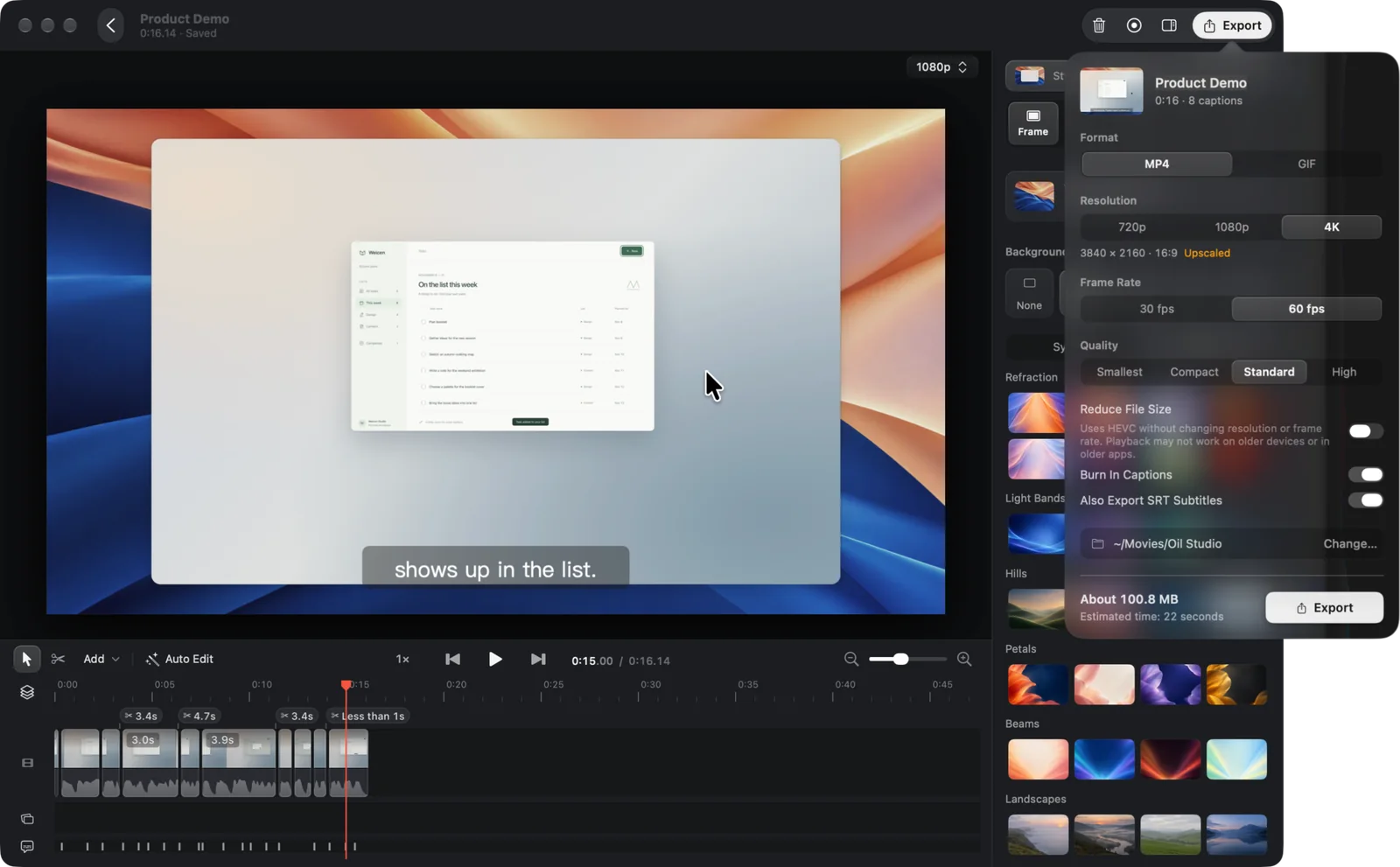
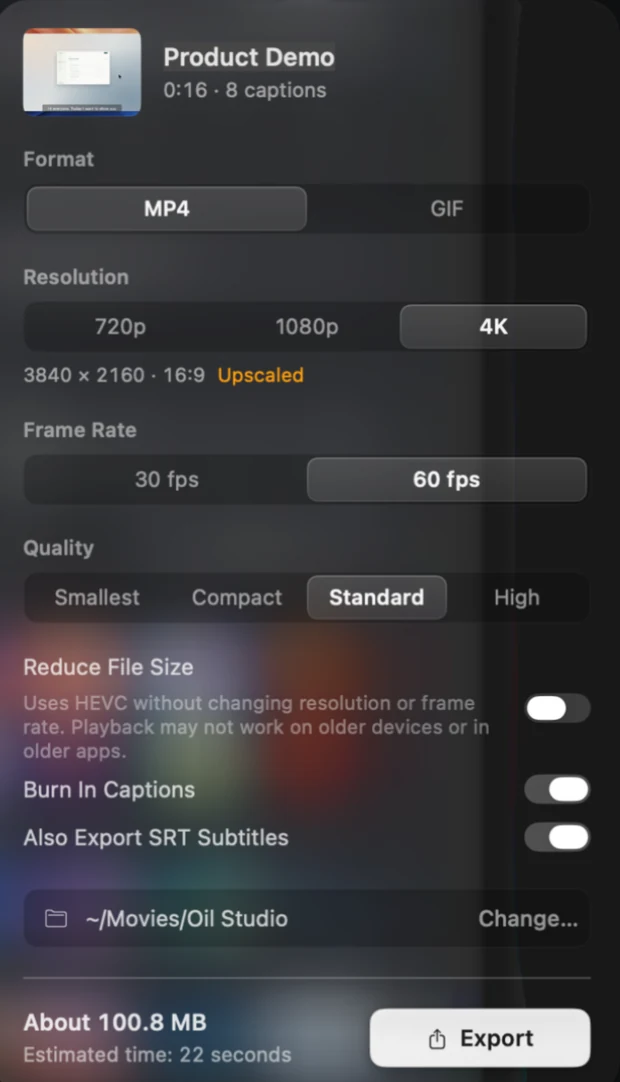
Customer-facing demos shouldn't sit behind third-party player chrome, 720p caps, or cloud upload spinners. Below is Oil Studio's native macOS Export sheet alongside its local window-to-MP4 capture loop:
Captured on macOS 15: every recording and finished MP4 writes directly to ~/Movies/Oil Studio on your disk — zero cloud workspace upload required.
1:1 Retina Export popover: pick MP4 or GIF, 720p / 1080p / 4K, 30 or 60 fps, optional HEVC compression, burned-in captions, and simultaneous SRT subtitle export with live size & time estimates.
Local window capture & MP4 export loop
Watch the local workflow: window capture, idle-gap trim & 60 fps MP4 export
See how Oil Studio captures a target Mac window with an always-visible recording pill, strips dead waiting time, and writes a clean 60 fps H.264/HEVC MP4 locally:
0:00✦ AI agent is recording❚❚■
Lists
This week
Done
Later
This week
New task
Write the demo scriptTue
Record a walkthroughWed
New task
Task name
CancelSave
Exporting · new-task-demo.mp4H.264 · 1080p60
Local export & file-ownership specifications
Platform: Apple silicon (M-series) · macOS 15+ · Local file ownership
~5×
1080p60 hardware export speed
Exports H.264 / HEVC directly on M-series chips (~1.5× realtime at 4K60) with zero cloud upload wait or player chrome.
0 B
Cloud workspace upload or lock-in
100% of .oilstudio projects and MP4 files live on your drive — no 25-video cap and zero broken links if you cancel subscriptions.
150 ms
Included word cuts & Keep Breath
Offline Whisper transcript editing and filler cleanup ship in the base app without a $240/yr per-seat AI add-on.
≤ 1 GB
15-minute editing memory budget
Pure Swift + Metal app with zero background browser-daemon bloat alongside Xcode, Docker, or local dev servers.
Specification matrix
15-point async cloud links vs polished local video matrix
✓ Built in / uncapped◐ Conditional / higher tier required— Outside product scope
The clearest way to choose between async link recorders and Oil Studio is to ask how long the recording matters. If you are showing a teammate a CSS glitch that will be fixed before lunch, an instant cloud link is frictionless.
When a video sits on your marketing homepage, release notes, onboarding docs, or YouTube channel for the next year, crisp click zooms, tight stumble-free voice-over, accurate captions, and clean MP4 ownership shape how every visitor judges your product.
Ephemeral team context (lives 2 hrs)
Quick internal check-ins where stumbles and unzoomed screens don't matter.
Public product showcase (lives 12 mos)
Record in Oil Studio with auto-zoom, teleprompter, and offline Whisper word cuts.
Own the asset forever
Drop the clean 60 fps MP4 onto your own CDN, docs, or social channels with zero subscription lock-in.
Editorial methodology
How we verify every claim on this page
This guide is published by the Oil Studio team. To make it genuinely useful as an engineering and buying reference rather than a one-sided pitch, we follow four strict rules:
Direct vendor pricing links:All 3-year TCO math uses published annual or one-time list prices from each vendor's official pricing page, linked inline so you can verify in one click.
1:1 Retina proof + live browser sandboxes:Every core Oil Studio workflow is shown with unretouched macOS 15 captures plus interactive demos you can test before downloading.
Explicit 'when NOT to pick us' callouts:We clearly flag Intel Macs, macOS 13–14, USB iOS recording, multi-guest podcasts, still screenshots, and hosted cloud links where other tools win.
Zero fabricated quotes or synthetic scores:We cite only verifiable architectural facts, hardware encoder baselines, and open-source CLI schemas.
Spot a vendor price or feature change? Email zhihuang.oiloil@gmail.com and we will verify and update this page within one business day.
Primary sources
Cited sources & public verification
Verify Loom's free limits and per-user pricing tiers alongside Oil Studio's local privacy and export specs:
Public notarized DMG version history and SHA-256 checksums.
Common questions
Frequently asked questions
How do I share videos exported from Oil Studio with teammates or customers?
Export a standard H.264 or HEVC MP4 (~5× realtime at 1080p60, compact file sizes with Reduce File Size enabled) and drag it straight into Slack, Linear, GitHub PRs, Notion, or upload to your own CDN, YouTube, or X.
What happens to old videos if you cancel a cloud screen recorder vs Oil Studio?
Downgrading or canceling cloud seat subscriptions often restricts management above free-tier video caps unless you bulk-export archives beforehand. Every Oil Studio project (.oilstudio) and MP4 lives on your own drive from day one.
Can I record warm, engaging product demos without showing my face on webcam?
Yes. Oil Studio includes a motion-tracked avatar that mirrors your head turns, speech, and blinks in real time — or you can record crisp Voice-Enhanced narration over automatically ducked background music.
Does Oil Studio ever upload proprietary code or customer screens to the cloud?
Never. Screen capture, timeline editing, default Whisper transcription, Voice Enhancement, and MP4/GIF export run locally on your Mac with zero bytes uploaded.
Download free to record and edit — pay once only when you export.
Test capture, spring zoom, and timeline editing free on Apple silicon. One license covers 2 Macs with $0 ongoing AI credit fees.
 Oil Studio