 Oil Studio
Auto zoom screen recording for Mac. One purchase.
The camera springs toward every click with a smoothed cursor and real motion blur. Built natively with Swift and Metal, with on-device captions, voice enhancement and avatar built in.

Spring zoomFollows every click
Clicks and cursor paths are captured live so camera zooms can be adjusted anytime on the timeline.
Native MetalSwift + Metal engine
Preview and export share one Apple silicon GPU pipeline, exporting 1080p60 at around 5× realtime.
Import readyBring existing projects
Import supported existing recording projects read-only with video tracks, clicks and zooms intact.
The camera goes where you click.
Every click and move is captured while you record. In the editor the camera springs toward the click and eases back out when you are done; near the edge it snaps so the frame never leaves the recording. The cursor is redrawn from its path: jitter removed, motion smoothed, fading out when it rests.
- The zoom block is the camera.Drag its start and end, change the factor or the centre, and the frame under the playhead updates at once.
- Cuts are not harsh.Cuts land in the pauses, the cursor and camera ease across them, and the picture can dissolve or gently push in.
- Motion blur.Camera moves and fast cursors get real motion blur, identical in the 60 fps preview and the export.

Fast exports, small files.
Exports use hardware-accelerated H.264 or HEVC encoding on Apple silicon, with one GPU render chain for preview and export. Choose quality presets including Standard and High; bitrate scales with resolution, frame rate, quality and codec.
1080p60 export speed
Measured on M-series chips; the bottleneck is decoding the source. 4K60 runs at about 1.5×, limited by the hardware encoder.
Hardware-accelerated encoding
H.264 or HEVC with configurable Standard and High quality presets. File size depends on resolution, frame rate, duration and export settings.
Preview frame rate
1080p preview reads the original footage with no proxies; drag the playhead and the frame keeps up.
Memory budget while editing
For a 15-minute project with captions, waveforms and filmstrips. Editing, exporting and recording never creep up over time.
Captions, voice and camera, all on-device.
Recording, editing, Whisper transcription, voice enhancement, skin smoothing and the avatar run on your Mac, without uploading audio or footage for core processing. Whisper works offline after the model download. Optional cloud transcription and narration send audio or captions to your chosen provider; the website edition needs periodic online license renewal.

On-device captions
A large Whisper model runs on your Mac and handles mixed languages and technical terms. Captions follow the edit; cut sentences vanish. Burn them in on export or save SRT.
Voice and music
Removes air-con hum, keyboard clatter and room noise; loudness levelling keeps the whole take even, and holding ⌥ compares with the original. Six background tracks are included, or import your own; the music ducks whenever you speak.
Skin smoothing and avatar
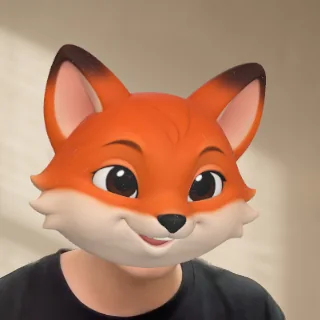
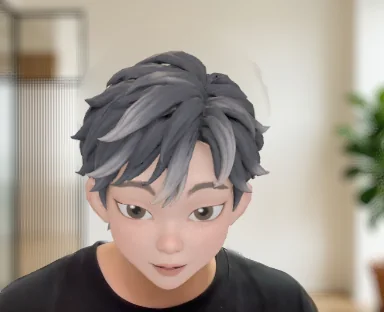
Camera smoothing touches skin only, never eyes or mouth. Rather not show your face? Swap in an avatar that follows your head, opens its mouth as you speak and blinks.
Teleprompter
Your script floats next to the camera and scrolls with your speech, or at a steady pace, or by hand. It is never captured in the recording.










Wallpapers and frame
56 original wallpapers in eleven series, or any wallpaper already on this Mac. Corner radius, padding, shadow and background blur live in one panel.
Camera layouts
Corner, side by side or full frame, switched per time range with smooth transitions. When the camera pushes in, the webcam shrinks out of the way.
Beautiful recordings, ready to finish.
Auto zoom and wallpapers are only the first half. Oil Studio brings transcript editing, on-device captions, voice enhancement and camera tools into one one-time purchase Mac app.
| Oil Studio | Typical subscription recorders | |
|---|---|---|
| Price | $39 Black Friday offer (20% off $49), one-time purchase | Mostly yearly subscriptions from $9/month, about $108/year |
| Auto zoom on clicks, smooth cursor, motion blur, wallpapers | Yes | Yes |
| Tighten pauses, remove fillers, cut by transcript | Yes, on word boundaries with natural breathing room | Partly |
| On-device Whisper captions | Built in, audio never uploaded, follows the edit | Some on-device, some upload to the cloud |
| Voice enhancement, music ducking, skin smoothing, avatar, teleprompter | All built in on-device; music ducks automatically while speaking | Partly |
| Privacy redaction & shortcut keycaps | Source-pixel blur/pixelate locked prior to zooms; modifier-only keycaps ignore Secure Input | Output-layer masks or unfiltered key logging |
| AI fine cut and autonomous demo recording | Bring your own Claude Code or Codex, no extra fee | None, or built-in cloud AI billed per use |
| Existing recording projects | Import directly read-only; original stays untouched | Each has its own format |
Common questions.
01How does automatic zoom work?
Oil Studio records your cursor coordinates and clicks alongside the video, automatically placing smooth spring zooms where you interact. You can drag, resize or retarget any zoom block on the timeline.
02Do pixelation or blur redactions drift when automatic zoom pans the screen?
No. Oil Studio redacts source pixels at the start of the Metal pipeline before camera zooms and AI agent frame inspection run, so redactions stay locked to the underlying window. Show Shortcuts also captures only ⌘ / ⌃ / ⌥ combinations and Esc, ignoring plain typing and macOS Secure Input password fields.
03Can I import my existing recording projects?
Yes. Oil Studio imports supported existing recording projects read-only, converting your footage, cursor path and zoom segments into a new .oilstudio project while leaving the original untouched.
04How fast is preview and export on Apple silicon?
Oil Studio is written natively in Swift and Metal. Preview runs at 60 fps directly from source media without proxies, and 1080p60 exports run at roughly 5× realtime within a 1 GB memory budget.
05What is included in the one-time purchase?
Everything: screen and window recording, timeline and transcript editing, on-device Whisper captions, voice and camera tools, and the local AI agent interface. One license activates on up to two Macs.
Recording, editing and captions, together.
Black Friday offer: $39 (20% off the $49 regular price, ends Dec 1). One-time purchase.
- Spring auto-zoom on clicks, smoothed cursor, motion blur, and 4K 60 fps hardware export
- Offline on-device Whisper captions and word-level transcript cutting (audio stays local)
- Sensitive-region privacy redaction, keystroke overlays, voice enhancement, and teleprompter
- Built-in AI Agent CLI & open-source Skill for Claude Code and Codex automation
- Activates on 2 Apple silicon Macs per license (inactive devices auto-release after 30 days)
- No subscription, no media-hour caps, and $0 AI credit fees — keep exporting with no annual renewal
One-time purchase, with no subscription or per-use charges. Try recording and editing for free, then activate export when you’re ready. Each license works on two Macs; a Mac that hasn’t checked in for 30 days automatically frees its spot.