 Oil Studio
Edit your screen recording by transcript.
Transcribe on your Mac with Whisper, cut footage by selecting words, and tighten pauses while keeping a natural breath.

- 0:04This is the new task panel: lists on the left, this week's work on the right.
- 0:09Click New in the corner, uh, like, to add a task.
- 0:13Then type a name and hit sa, wait, let me say that again.
- 0:17Type a name, hit Save, and the task shows up in the list.
- 0:22Tick a task off and it moves to Done by itself.
ListenOn-device Whisper
Whisper generates word-level timestamps on your Mac. Audio and footage stay local.
SelectCut by text
Select a retake or tangent and press ⌘⌫. Video, audio and captions tighten together.
BreatheKeep the breath
Pause cleanup leaves a natural 150 ms breath on word boundaries so cuts never sound clipped.
Finish talking, and the cut is done.
What eats time in a voice-over recording is pauses, retakes and filler words. Oil Studio transcribes on your Mac first, then cuts on word boundaries. Auto cleanup marks every pause and filler, and one button removes them all; AI fine cut is handed to your own AI agent, which reads the whole transcript, finds retakes, slips and abandoned sentences, and lists them as a plan for you to confirm. Both work from what you say, so they are made for voice-over recordings. Zoom blocks and the playhead move to their new places, and ⌘Z undoes it in one step.
Cut the video by reading the transcript.
The caption list is the cutting table: select a sentence or a run of them, press ⌘⌫, and that stretch of video and captions is gone. Cuts land on word boundaries and snap to silence, never into a neighbouring word. Retakes and abandoned sentences disappear after one read-through.
- Fillers grouped by word.“um” and “uh” go by default; “like” and “so” are sometimes part of the sentence, so they stay unless you say otherwise.
- Captions follow the edit.Cut sentences leave the captions; undo brings them back with your edits, translations and chapters intact.
- AI fine cut with your own agent.Copy a prompt from the app into Claude Code or Codex. It clears the pauses first, then finds retakes and slips, and sends the plan back to the app for you to confirm. No account and no extra charge.
Captions, voice and camera, all on-device.
Recording, editing, Whisper transcription, voice enhancement, skin smoothing and the avatar run on your Mac, without uploading audio or footage for core processing. Whisper works offline after the model download. Optional cloud transcription and narration send audio or captions to your chosen provider; the website edition needs periodic online license renewal.

On-device captions
A large Whisper model runs on your Mac and handles mixed languages and technical terms. Captions follow the edit; cut sentences vanish. Burn them in on export or save SRT.
Voice and music
Removes air-con hum, keyboard clatter and room noise; loudness levelling keeps the whole take even, and holding ⌥ compares with the original. Six background tracks are included, or import your own; the music ducks whenever you speak.

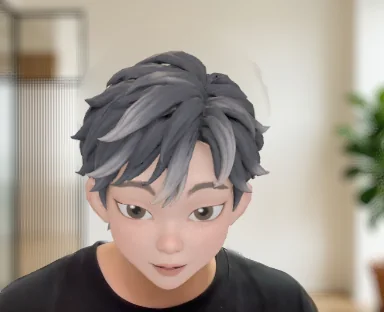
Skin smoothing and avatar
Camera smoothing touches skin only, never eyes or mouth. Rather not show your face? Swap in an avatar that follows your head, opens its mouth as you speak and blinks.
Teleprompter
Your script floats next to the camera and scrolls with your speech, or at a steady pace, or by hand. It is never captured in the recording.










Wallpapers and frame
56 original wallpapers in eleven series, or any wallpaper already on this Mac. Corner radius, padding, shadow and background blur live in one panel.
Camera layouts
Corner, side by side or full frame, switched per time range with smooth transitions. When the camera pushes in, the webcam shrinks out of the way.
One workflow. One purchase.
Skip the round-trip exports and separate subscriptions between a screen recorder and a text-based video editor.
| Oil Studio | Recorder + subscription transcript editor | |
|---|---|---|
| Price | $39 Black Friday offer (20% off $49), one-time purchase | Two separate subscriptions, often $200–$300/year combined |
| Recording, text editing and captions | Together in one native Mac app | Requires exporting and importing between apps |
| Pauses and fillers | Word-boundary cuts with 150 ms breathing room; “um / uh” removed, “like / so” kept for review | Depends on the transcript editor |
| Captions | On-device Whisper, audio never uploaded, captions follow edits | Often uploaded to the cloud and billed by hours |
| AI fine cut for retakes | Use your own Claude Code or Codex, confirmed item by item, no extra charge | Often requires a higher tier or usage credits |
Common questions.
01Can I cut a recording by selecting text?
Yes. Select the sentence in the transcript and press ⌘⌫. The matching footage and caption are cut together, and zoom blocks shift automatically.
02Does it remove every filler word blindly?
No. Hesitations like “um” and “uh” are removed by default, while words like “like” and “so” can carry meaning and stay unless you choose to cut them.
03Do captions require uploading my audio?
Not with default on-device Whisper. Audio is only sent to a cloud service if you explicitly configure your own cloud key in settings.
04Can I undo a transcript cut?
Yes. Press ⌘Z at any time to restore the footage, captions and chapters in one step.
05Can I generate AI voice-over narration with my own ElevenLabs or OpenRouter API key?
Yes. After proofreading or translating captions, configure your own ElevenLabs, OpenRouter, Alibaba Cloud Bailian, ZenMux, MiniMax, or OpenAI-compatible key in Caption Narration to synthesize speech locked to your caption timing, with zero markup from Oil Studio.
Recording, editing and captions, together.
Black Friday offer: $39 (20% off the $49 regular price, ends Dec 1). One-time purchase.
- Spring auto-zoom on clicks, smoothed cursor, motion blur, and 4K 60 fps hardware export
- Offline on-device Whisper captions and word-level transcript cutting (audio stays local)
- Sensitive-region privacy redaction, keystroke overlays, voice enhancement, and teleprompter
- Built-in AI Agent CLI & open-source Skill for Claude Code and Codex automation
- Activates on 2 Apple silicon Macs per license (inactive devices auto-release after 30 days)
- No subscription, no media-hour caps, and $0 AI credit fees — keep exporting with no annual renewal
One-time purchase, with no subscription or per-use charges. Try recording and editing for free, then activate export when you’re ready. Each license works on two Macs; a Mac that hasn’t checked in for 30 days automatically frees its spot.