How CleanShot X (the macOS menu-bar screenshot and quick-clip utility) and Oil Studio (the auto-zoom screen recorder and transcript video editor) divide the workflow — and why many Mac builders keep both.
Verified November 2026 · Both apps champion native macOS craft & one-time licensing
10-second executive scorecard
One-time price (2 Macs)
Oil Studio$39 offer / $49 regular (paid once)
CleanShot X$59 Basic one-time ($35 for 1 Mac) + 1 yr updates
CleanShot XIntel + Apple silicon · Includes 1 GB cloud links
Both are native Mac apps with fair one-time purchase options, built for completely different moments of the workday. CleanShot X lives in your menu bar for instant region screenshots, callout arrows, scrolling capture, pin-to-screen reference images, OCR text extraction, and quick 15-second bug clips. Oil Studio is a dedicated production studio for narrated demos, launch videos, and tutorials — adding click-driven spring zoom, offline Whisper captions, word-level video cuts, Voice Enhancement, music ducking, and 4K60 MP4 / GIF hardware export.
When Oil Studio fits better
You are recording a customer-facing launch video or tutorial:Automatically zoom into clicks with spring physics, smooth pointer jitter, frame windows over 56 wallpapers, and display keyboard shortcuts.
You speak on mic and don't want to re-record every stumble:Cut retakes by deleting words in the offline Whisper transcript, tighten pauses to 150 ms breaths, and duck background music automatically.
You appear on camera or read from script notes:Switch between overlay, Side by Side, and fullscreen camera layouts with Skin Smoothing, tracked avatars, and an invisible floating teleprompter.
You automate product demos with Claude Code or Codex:Use the oilstudio CLI to record app flows and strip idle pauses programmatically when shipping releases.
C
When CleanShot X fits better
You take dozens of annotated screenshots every day:Snap a region, add numbered arrows, blur an email, and paste straight into Slack, Linear, or GitHub Issues in 3 seconds.
You need scrolling capture, pin-to-screen, or OCR:Capture tall web pages, float reference mockups above other windows, or copy text out of images.
You want instant disposable cloud bug links:Trim the start and end of a 10-second bug reproduction and copy a CleanShot Cloud URL immediately.
You run an Intel Mac:CleanShot X supports both Intel and Apple silicon Macs; Oil Studio requires Apple silicon on macOS 15+.
Capability deep-dives
Why so many Mac builders keep both installed side by side
Recording a 3-minute narrated product launch in a screenshot tool is just as painful as opening a timeline studio to paste an arrowed screenshot into a pull request. Here is where the boundary sits:
01Mobile-feed legibility
Unzoomed 27-inch flat capture vs click-driven spring zoom
UI controls that look fine on a desktop display turn microscopic on mobile feeds and docs embeds.
How Oil Studio works
Logs pointer coordinates and typing focus during capture, automatically framing active controls with spring physics, 180° motion blur, and redrawn jitter-free cursor paths so viewers on phones read every click.
How competitor works
Records flat 1:1 screen pixels — fast and accurate for showing an engineer a bug on desktop, without post-capture zoom blocks or cursor smoothing.
Bottom line:Whenever a clip goes onto your homepage, changelog, X, or YouTube, automatic zoom framing makes the UI legible.
02Retake forgiveness
One verbal stumble = full re-record vs offline Whisper word cuts
Start/end trimming works for 10-second silent clips, not 4-minute narrated walkthroughs.
How Oil Studio works
Guides your delivery with an invisible camera-side teleprompter, then transcribes locally with Whisper so you can delete flubbed sentences by text and compress dead air to 150 ms breaths.
How competitor works
Includes a lightweight start/end trimmer after capture with no multi-cut timeline, speech transcription, or automatic music ducking.
Bottom line:Use a quick-clip utility under 30 seconds; use a transcript-aware studio whenever you speak on mic.
03Still-capture mastery
CleanShot X remains unmatched for still annotations, scrolling & OCR
Focused Mac apps stay fast by refusing to bloat into everything-apps.
How Oil Studio works
Stays 100% focused on motion screen recording and post-capture editing — never hijacking your screenshot shortcuts.
How competitor works
Delivers instant region capture, numbered callouts, scrolling capture, floating Pin reference windows, and menu-bar OCR.
Bottom line:Keep CleanShot X in your menu bar for daily PRs, tickets, and design feedback.
04Buy-once economics
Owning both one-time apps still costs less than 1 year of cloud SaaS
Two focused perpetual Mac licenses beat renting one bloated subscription suite.
How Oil Studio works
One payment activates 2 Macs with offline Whisper, Voice Enhancement, and the oilstudio CLI included at $0 ongoing cost.
How competitor works
Basic one-time license is $59 for 2 Macs ($35 for 1 Mac) with 1 year of updates and 1 GB cloud storage; keep using your version forever even without renewing.
Bottom line:Pair them without conflict, or start with whichever bottleneck — screenshots vs polished demos — hits you today.
Ownership ledger
3-year ownership cost & licensing breakdown
Both tools respect one-time buyers — shown below for 1 user across 2 Macs
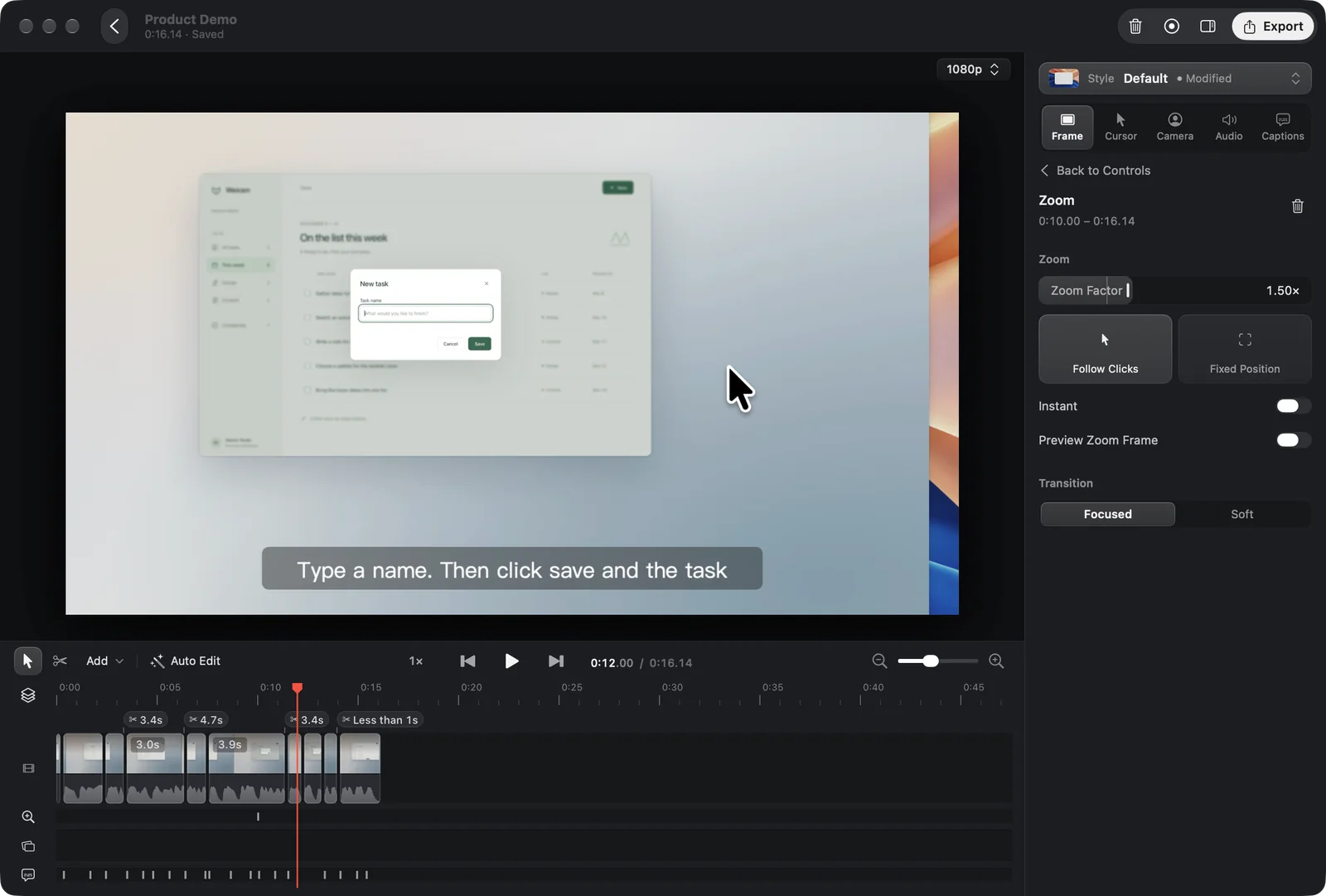
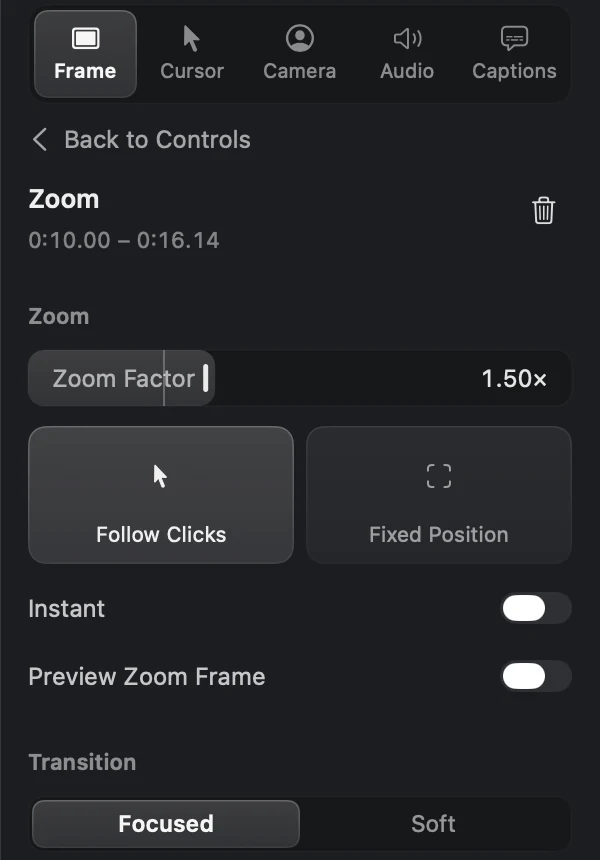
Unzoomed full-screen recordings become unreadable on mobile feeds, and raw hand tremor stands out whenever you move across a button. Inspect Oil Studio's native Zoom inspector and test the live cursor spring below:
Captured on macOS 15: pointer clicks and typing focus automatically generate smooth zoom blocks on the timeline so viewers on phones and laptops never squint at tiny controls.
1:1 Retina Zoom inspector: adjust Zoom Factor (1.50× shown), switch between Follow Clicks and Fixed Position, preview the zoom frame, and choose Focused or Soft spring transitions.
Live spring physics · Move your pointer inside
Try it live: raw pointer tremor vs spring-smoothed cursor
Move your cursor across the dark stage below: the translucent trail shows raw hand jitter from flat screen capture, while the solid white cursor shows Oil Studio's spring-smoothed path:
Raw pathOil Studio
Move your mouse in here
Metal compositor & output specifications
Platform: Apple silicon (M-series) · macOS 15+ · Native Metal pipeline
60 fps
Direct-from-source timeline preview
Opens recordings immediately at 60 fps without waiting on background proxy transcoding.
180°
Shutter motion blur & spring cursor
Logs every click and pointer path during capture so zoom, cursor redraw, and motion blur stay adjustable anytime.
56 walls
Original wallpapers & 6 ducked tracks
Includes 56 original wallpapers across 11 series, macOS wallpaper support, and music that ducks automatically when you speak.
MP4 · GIF
4K60 H.264 / HEVC, GIF & SRT output
Export edited auto-zoom sequences either as crisp 60 fps MP4/HEVC video with SRT subtitles or directly as an animated GIF.
Specification matrix
15-point quick-capture utility vs demo studio matrix
✓Full timeline editor with splits, speed changes & smooth transitions
◐Simple start/end trim handle after capture
Offline Whisper captions & word-delete video cuts
✓Built-in local Whisper word cuts, burned captions & SRT export
—No speech transcription or caption track
Remove Pauses (150 ms Keep Breath), Voice Enhancement & ducking
✓All built in locally with automatic music ducking
—Records mic + system audio; no post-capture voice/music mixer
4. Video redaction, AI agent CLI & localization
Specification
Oil Studio
CleanShot X
Zoom-locked timeline pixelation / blur masks
✓Base-texture redaction across timed timeline ranges
◐Fast still-image pixelation; no zoom-tracked video redaction
Claude Code / Codex CLI demo capture & fine-cut proposals
✓Built-in oilstudio CLI + open Agent Skill
◐URL scheme capture triggers; no AI edit-proposal protocol
Read-only import of existing recording projects
✓Built-in instant read-only project import
—Not applicable (quick-capture utility)
Interface localization
✓Native English & Simplified Chinese UI
◐English UI
Better together
Split by lifespan: 5-second PR context vs 12-month product assets
Recording a 3-minute narrated walkthrough in a quick-capture utility means one verbal stumble forces a full re-take, and mobile viewers can barely read unzoomed UI controls. Conversely, opening a timeline studio just to paste a red-boxed screenshot into a PR is overkill.
Splitting by audience keeps both effortless: use your menu-bar screenshot tool for disposable internal context, and open Oil Studio whenever a video or zoomed GIF goes onto your homepage, changelog, docs, YouTube, or X.
Internal bug & PR context (< 30s)
Snap an annotated screenshot or 10-second silent clip straight to your clipboard.
Changelogs, docs & launches (1–15m)
Record in Oil Studio with the floating teleprompter, automatic click zooms, and Show Shortcuts.
One-minute polish & export
Tighten pauses, enable Lower While Speaking on music, and export 60 fps MP4 or animated GIF.
Editorial methodology
How we verify every claim on this page
This guide is published by the Oil Studio team. To make it genuinely useful as an engineering and buying reference rather than a one-sided pitch, we follow four strict rules:
Direct vendor pricing links:All 3-year TCO math uses published annual or one-time list prices from each vendor's official pricing page, linked inline so you can verify in one click.
1:1 Retina proof + live browser sandboxes:Every core Oil Studio workflow is shown with unretouched macOS 15 captures plus interactive demos you can test before downloading.
Explicit 'when NOT to pick us' callouts:We clearly flag Intel Macs, macOS 13–14, USB iOS recording, multi-guest podcasts, still screenshots, and hosted cloud links where other tools win.
Zero fabricated quotes or synthetic scores:We cite only verifiable architectural facts, hardware encoder baselines, and open-source CLI schemas.
Spot a vendor price or feature change? Email zhihuang.oiloil@gmail.com and we will verify and update this page within one business day.
Primary sources
Cited sources & public verification
Verify CleanShot X's published Basic and Cloud Pro pricing alongside Oil Studio's motion and export specs:
Does Oil Studio plan to add still screenshots or OCR?
No. Oil Studio stays focused on recording and editing high-craft screen videos — zoom motion, voice-over editing, captions, audio polish, and coding-agent workflows — so it complements dedicated screenshot utilities cleanly.
Is Oil Studio still worthwhile for silent 15-second changelog clips or GIFs?
Yes. Silent social and changelog clips benefit most from automatic click zoom, spring-smoothed cursor movement, modifier-aware shortcut keycaps, and direct GIF or 60 fps MP4 export so viewers see every action on mobile screens.
Do the two apps conflict if installed on the same Mac?
Not at all. Each uses standard macOS capture permissions and independent shortcuts, so they run side by side without friction.
Can I import a flat MP4 recorded in CleanShot X into Oil Studio for auto-zoom?
Flat MP4 files do not contain raw macOS pointer coordinates or click timestamps. To get automatic click-driven spring zoom and cursor smoothing, initiate the recording directly in Oil Studio.
Download free to record and edit — pay once only when you export.
Test capture, spring zoom, and timeline editing free on Apple silicon. One license covers 2 Macs with $0 ongoing AI credit fees.
 Oil Studio