Objective comparison

Oil Studio vs Descript

Compare two transcript-driven video editors with fundamentally different architectures: Oil Studio's native Apple silicon one-time app with auto-zoom capture and offline Whisper vs Descript's cloud multitrack podcast and team collaboration suite.

Verified November 2026 · Includes native macOS Whisper captures & public quota docs

10-second executive scorecard
License & monthly quotas
Oil StudioOne-time purchase (2 Macs), unlimited local hours
DescriptCreator $288/yr, capped at 30 media hrs/mo & AI credits
3-year ownership cost
Oil Studio$39 offer / $49 regular ($0 in years 2–3)
Descript$864 (Creator 4K annual plan × 3 years)
Where transcription runs
Oil Studio100% offline on-device Whisper (0 bytes uploaded)
DescriptCloud upload required for transcription & sync
Screen auto-zoom & cursor physics
Oil StudioSpring click zoom, cursor redraw & shortcut keycaps
DescriptFlat screen capture; word cuts create pointer jump-cuts
Multi-guest podcasts & Web review
Oil StudioSolo native studio for macOS 15+ Apple silicon
DescriptWins: remote studio rooms & Mac/Win/Web comments

Both tools let you cut video by deleting words instead of hunting through audio waveforms, yet they serve distinct workflows. Descript is a cloud-first multitrack podcast and video collaboration platform across Mac, Windows, and Web, billed per seat with monthly Media Hours and AI Credit meters. Oil Studio is a native Apple silicon Mac screen recorder and editor sold once: Whisper transcription runs offline on your Mac, and word cuts stay mathematically locked to click-driven spring zoom blocks, cursor paths, and local coding-agent automation.

When Oil Studio fits better

  • You produce software demos and technical tutorials:Combine word-level speech cuts with automatic click zoom, spring-smoothed cursors, Show Shortcuts overlays, and pixelation redaction in one native app.
  • Your screen and voice must stay off third-party clouds:Pre-release features, customer dashboards, and terminal secrets stay on your Mac with offline on-device Whisper.
  • You dislike monthly Media Hours and AI Credit meters:Record, transcribe, and re-cut as many hours as you want after a single purchase.
  • You want instant native performance offline:Built in Swift and Metal with a ≤ 1 GB memory budget on 15-minute timelines and ~5× realtime 1080p60 hardware export.

When Descript fits better

  • You edit multi-guest podcasts and remote interviews:Descript includes cloud multitrack remote recording rooms, multi-speaker labeling, and multicam scene switching.
  • Your team collaborates across Windows, Mac, and Web:Producers and reviewers can comment on shared cloud timelines directly in a browser.
  • You rely on generative cloud effects:Features such as voice-cloning overdubs or AI eye-contact correction are part of Descript's cloud AI suite.
  • Your footage comes from cameras rather than Mac screen capture:When cursor trajectories, window framing, and click-driven zooms are irrelevant to your videos.
Capability deep-dives

4 architectural gaps beneath 'edit video like a doc'

Deleting a sentence from a talking-head podcast works in any document editor. Deleting a sentence from a Mac UI walkthrough without breaking cursor continuity or uploading proprietary screens is a very different engineering problem:

01Cut-boundary motion continuity

Flat pixel jump-cuts vs pointer-and-zoom-aware word cuts

General transcript editors treat screen recordings as flat pixels — every text delete snaps the cursor.

How Oil Studio works

Transcript words, waveforms, native macOS pointer coordinates, and spring zoom blocks share one unified timeline. Selecting a flubbed sentence and pressing ⌘⌫ re-interpolates cursor movement and 1.5× zoom framing smoothly across the cut.

How competitor works

Treats screen recordings as flat video streams. Deleting a spoken phrase slices raw frames out of the middle, causing abrupt pointer jumps and offering no click-driven spring zoom engine.

Bottom line:For software walkthroughs, keeping cursor motion and zoom blocks coupled to word cuts makes edits invisible.
02Privacy & air-gapped speed

Zero-upload on-device Whisper vs mandatory cloud media sync

Unannounced features, customer databases, and terminal env vars belong on your disk, not a cloud bucket.

How Oil Studio works

Once the Whisper model is downloaded, transcription, pause tightening, Voice Enhancement, and 4K60 GPU export run 100% locally on Apple silicon — even on a plane or air-gapped network.

How competitor works

Uploads audio and project media to cloud servers for transcription and team sync, requiring internet access and counting imported files against monthly cloud quotas.

Bottom line:Local Whisper eliminates upload latency and cloud security reviews in one stroke.

03Predictable cost vs usage meters

Unlimited local takes vs monthly Media Hours & per-seat billing

Narrated tutorials often take three or four passes — metered media hours penalize iteration.

How Oil Studio works

One payment activates 2 Macs with unlimited local recording hours, unlimited Whisper re-transcriptions, and $0 AI credit meters forever.

How competitor works

Watermark-free 4K export starts on Creator at $288/seat/year ($864 over 3 years) with 30 Media Hours/month and 800 AI Credits/month.

Bottom line:Solo builders and educators save over $800 across three years with zero monthly hour anxiety.

04Multitrack podcasts vs coding-agent CLI

Descript wins multi-speaker podcasts; Oil Studio wins developer workflows

Pick based on whether you collaborate with remote podcast guests or with Claude Code and Codex.

How Oil Studio works

Purpose-built for single-Mac screen, mic, and camera production, adding the oilstudio CLI so local coding agents can propose fine cuts or record live app flows autonomously.

How competitor works

Shines on multi-guest remote recording rooms, automatic speaker diarization, multicam layouts, and browser-based team review threads.

Bottom line:Use Descript for multi-guest podcasts and cross-OS editorial teams; use Oil Studio for Mac product demos and tutorials.

Ownership ledger

3-year ownership cost & quota comparison

Comparing Oil Studio one-time (2 Macs, 4K60) against Descript Creator annual (1 seat, 4K watermark-free)

Verify on Descript official pricing ↗
Oil StudioBlack Friday · 20% off

Pay $39 once ($49 regular) · No subscription renewal

Year 1 spend$39
3-year total$39
  • One-time license for 2 Macs, up to 4K60 hardware export
  • Unlimited local transcription hours · $0 AI credit meters
DescriptPublished pricing

Creator: $24/seat/mo billed annually ($288/yr); Hobbyist: $16/seat/mo (1080p cap)

Year 1 spend$288
3-year total$864
  • Billed per editor seat; Free plan caps at 720p watermarked & 1 media hr/mo
  • Creator includes 30 media hrs/mo & 800 AI credits/mo; imported footage counts toward hours
36-month cumulative spend visual scale (2 Macs)Cut 3-year software spend by ~94% (saving $800+) with zero monthly Media Hours caps
Oil Studio$39 · $0 in years 2 & 3
Descript$864 · Based on Creator 4K annual plan at $288/yr × 3 years (Business reaches $1,800/seat over 3 yrs)

Note: Descript also offers Hobbyist at $192/yr ($16/mo annual, 10 media hrs/mo, 1080p) and Business at $600/seat/yr ($50/mo annual, 40 media hrs/mo).

First-hand evidence

Native offline Whisper UI captures & live word-cut sandbox

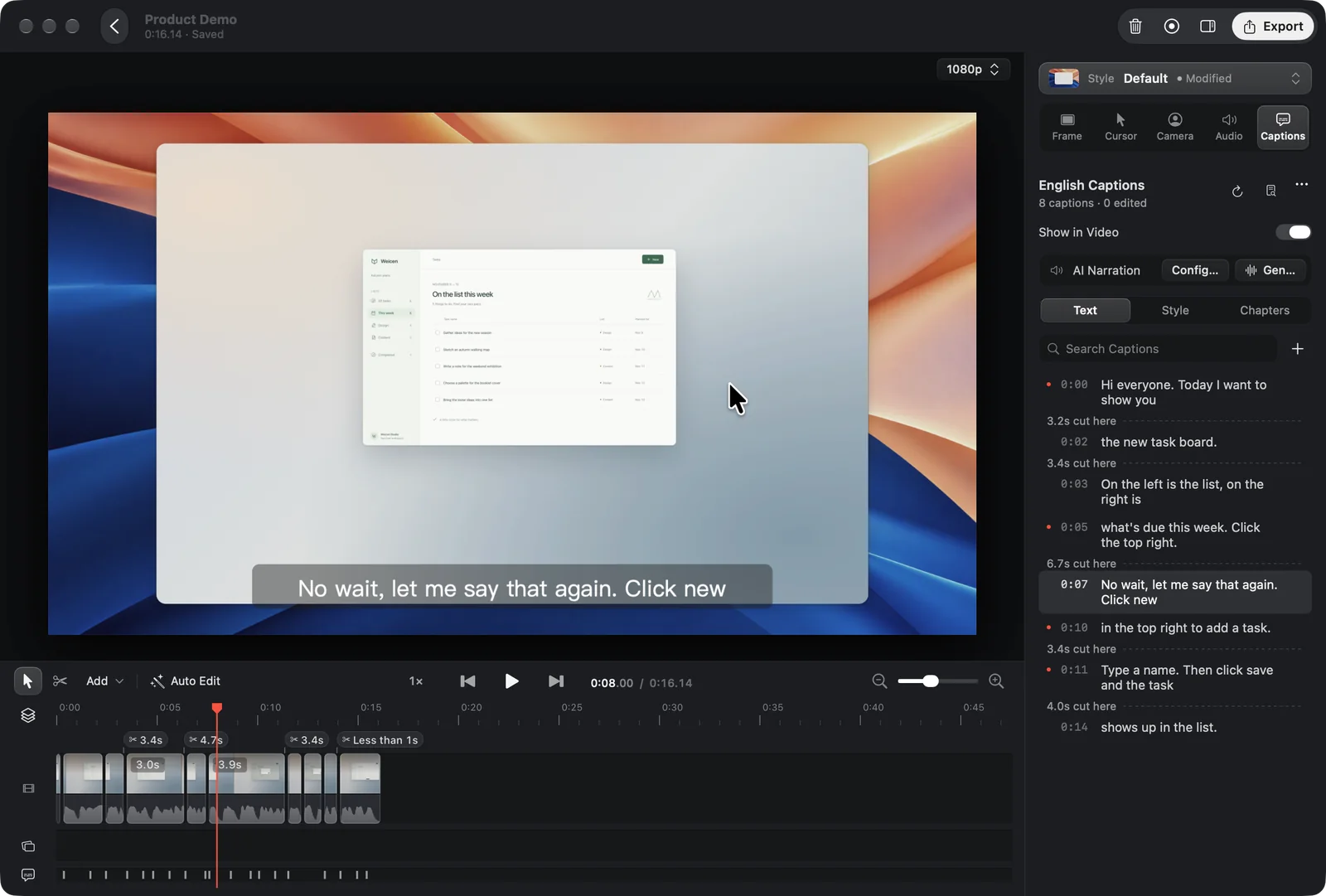
Cutting a screen recording by text requires more than speech-to-text: deleting a flubbed sentence must also re-project pointer motion and zoom blocks so the frame never jumps:

Real Oil Studio macOS 15 editor window showing English Captions transcribed on-device alongside synchronized timeline cut markers
Captured on macOS 15: Whisper runs locally on Apple silicon with zero audio upload; cutting a spoken retake updates the preview canvas, waveform track, and zoom blocks together.
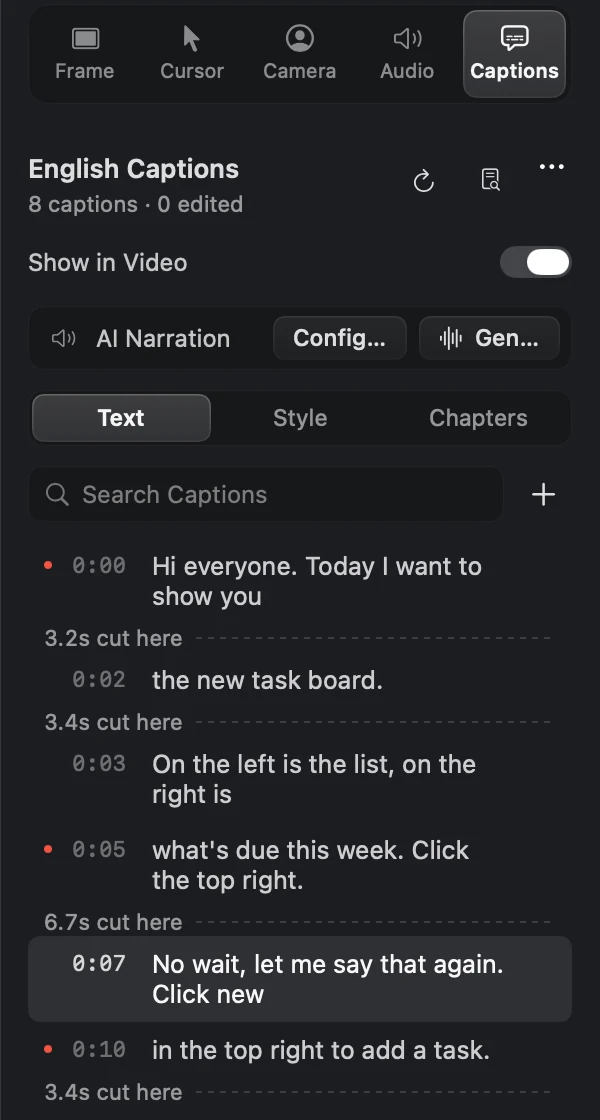
1:1 Retina close-up of Oil Studio's Captions inspector showing '3.2s cut here', the selected retake 'No wait, let me say that again', and AI Narration controls
1:1 Retina Captions inspector: cut durations remain clearly marked inline ('3.2s cut here', '6.7s cut here'), with instant caption search, chapter markers, and optional Caption Narration.
Interactive · No download needed

Try it live: cut the spoken retake and watch zoom blocks follow

Click the highlighted retake line in the transcript or press Cut Video at the bottom-right to see how the timeline and 1.5× / 1.3× zoom blocks re-align cleanly:

ListTextStyle
On-device · English
  1. 0:04This is the new task panel: lists on the left, this week's work on the right.
  2. 0:09Click New in the corner, uh, like, to add a task.
  3. 0:13Then type a name and hit sa, wait, let me say that again.
  4. 0:17Type a name, hit Save, and the task shows up in the list.
  5. 0:22Tick a task off and it moves to Done by itself.
3.6 s cut here
1 sentence · 3.6 sDelete caption only

Offline Whisper & memory specifications

Platform: Apple silicon (M-series) · macOS 15+ · Offline local pipeline
0 B
Cloud audio or screen upload

Once downloaded, the Whisper speech model runs 100% locally on Apple silicon — proprietary UIs and voice-overs never leave your Mac.

≤ 1 GB
15-minute transcript editing budget

Holds captions, waveforms, and filmstrips within a 1 GB memory budget without creeping up over long sessions.

Unlimited
Local transcription hours & re-cuts

No monthly Media Hours cap and zero AI credit deductions regardless of how many takes you record.

~5×
1080p60 hardware export speed

Skip cloud render queues and export MP4 (H.264 / HEVC), GIF, and standalone SRT subtitles directly on Apple silicon.

Specification matrix

16-point transcript engine, screen-capture & quota matrix

✓ Built in / un-metered◐ Conditional / cloud or tier metered— Outside product scope

1. Licensing, monthly quotas & offline access

SpecificationOil StudioDescript
Pricing model & watermark-free 4K export
✓One-time purchase (2 Macs), permanent 4K60 export
◐Per-seat subscription (Free tier capped at 720p watermarked)
Monthly Media Hours & AI Credit limits
✓Unlimited local hours and re-transcriptions
◐Metered 10–40 Media Hours/mo & AI Credits by tier
Full air-gapped / offline recording, transcription & export
✓Works completely offline once Whisper model is downloaded
—Requires internet connectivity for cloud transcription & sync

2. Speech recognition & word-level editing depth

SpecificationOil StudioDescript
Where speech recognition runs
✓Offline on-device Whisper on Apple silicon; zero audio upload
◐Cloud upload for transcription and project media sync
Delete words in transcript to cut video
✓Built in — synchronously cuts screen, audio & spring zoom blocks
✓Built in — full document-style multitrack text editing
Remove Pauses (Keep Breath) with click/keystroke protection
✓Built in — 150 ms Keep Breath + flags pauses with UI clicks/keys
◐Built in — shorten word gaps & fillers; no pointer/key awareness
Remote multi-guest podcast rooms & multi-speaker tracks
—Focused on single-Mac screen, mic & camera walkthroughs
✓Built-in remote studio rooms & multi-speaker script editing
Generative voice cloning & AI eye-contact effects
◐Supports BYO-key Caption Narration; no generative eye redraw
✓Built-in cloud voice overdub & eye contact (uses AI credits)

3. Mac screen recording & zoom cinematography

SpecificationOil StudioDescript
Click-driven spring auto zoom, cursor smoothing & motion blur
✓Built in from native macOS pointer & click telemetry
—Flat screen capture; no pointer-driven spring zoom engine
Show Shortcuts keycaps & invisible floating teleprompter
✓Built in modifier/shortcut keycaps & camera-side teleprompter
◐Script notes supported; no native macOS keystroke keycap overlay
56 built-in wallpapers, rounded window shadows & aspect switch
✓Built-in macOS window framing & non-destructive 16:9 / 9:16 / 1:1
◐General video canvas; no automatic macOS window shadow framing
Voice Enhancement & automatic music ducking
✓Local Voice Enhancement (⌥ A/B preview) + 6 ducked music tracks
✓Cloud Studio Sound (uses AI credits) + multitrack ducking

4. Collaboration, privacy redaction & agent CLI

SpecificationOil StudioDescript
Cross-platform Windows / Web team review comments
◐Single-user native app for macOS 15+ on Apple silicon
✓macOS, Windows & browser collaboration with timestamped comments
Pre-zoom base-texture pixelation / blur masks
✓Redacts raw screen texture prior to zoom magnification & AI sampling
◐Manual shape overlays; no pre-zoom base-texture redaction
Local Claude Code / Codex CLI automation
✓Built-in oilstudio CLI for AI Edit proposals & autonomous capture
◐Cloud assistant; no local CLI window-capture protocol
15-minute memory footprint & local GPU export speed
✓Native Swift + Metal ≤ 1 GB budget, ~5× realtime 1080p60 export
◐Cross-platform desktop wrapper with higher memory overhead
Under the hood

From hitting Stop to a 60 fps MP4 in three local steps

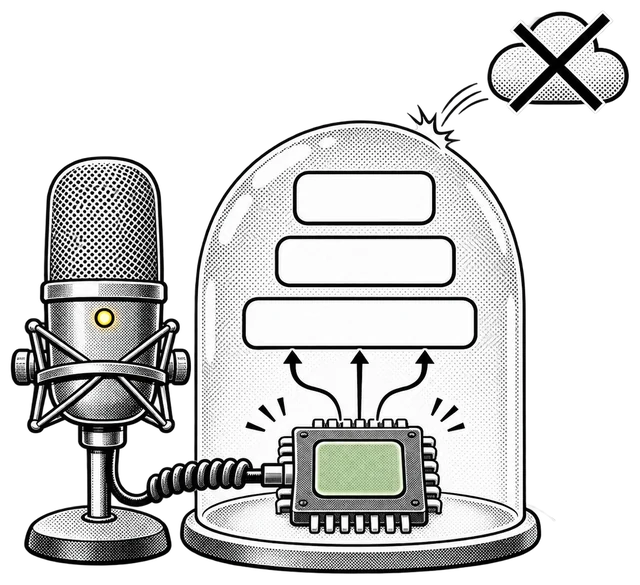
In a cloud transcript editor, every screen recording starts with an upload progress bar and ends in a cloud render queue — and deleting a spoken sentence snaps the cursor across the screen.

In Oil Studio, transcript words, audio waveforms, pointer coordinates, and spring zoom blocks live on one local timeline. Pressing ⌘⌫ re-interpolates cursor motion and zoom framing immediately with zero network wait.

Condenser microphone wired directly into an on-device silicon chip inside a protective dome while cloud upload bounces off
01 · Transcribe locally

Run Whisper directly on Apple silicon right after capture — technical jargon included, with zero upload wait.

02 · Tighten pauses & cut retakes

Compress dead air down to 150 ms natural breaths, then select retakes and press ⌘⌫.

03 · Export directly on GPU

Skip cloud render queues and export 1080p60 MP4 and SRT at ~5× realtime via Apple hardware encoders.

Editorial methodology

How we verify every claim on this page

This guide is published by the Oil Studio team. To make it genuinely useful as an engineering and buying reference rather than a one-sided pitch, we follow four strict rules:

Direct vendor pricing links:All 3-year TCO math uses published annual or one-time list prices from each vendor's official pricing page, linked inline so you can verify in one click.
1:1 Retina proof + live browser sandboxes:Every core Oil Studio workflow is shown with unretouched macOS 15 captures plus interactive demos you can test before downloading.
Explicit 'when NOT to pick us' callouts:We clearly flag Intel Macs, macOS 13–14, USB iOS recording, multi-guest podcasts, still screenshots, and hosted cloud links where other tools win.
Zero fabricated quotes or synthetic scores:We cite only verifiable architectural facts, hardware encoder baselines, and open-source CLI schemas.

Spot a vendor price or feature change? Email zhihuang.oiloil@gmail.com and we will verify and update this page within one business day.

Primary sources

Cited sources & public verification

Check Descript's published seat pricing and quota rules alongside Oil Studio's local Whisper documentation:

Common questions

Frequently asked questions

What if I make both software demos and multi-guest podcasts?
Descript is purpose-built for multi-speaker remote podcasts and browser review. If your main output is solo Mac product demos, engineering walkthroughs, and course lessons, Oil Studio gives you native auto-zoom framing and eliminates ongoing seat and media-hour bills.
Does local Whisper slow down my Mac on longer recordings?
Oil Studio runs hardware-accelerated speech recognition on Apple silicon within a strict ≤ 1 GB editing memory budget on 15-minute projects, transcribing typical multi-minute demos in seconds.
How does Oil Studio handle developer jargon and CLI flags in captions?
Whisper handles mixed technical vocabulary well locally, and you can apply custom terminology replacements or let Claude Code run oilstudio subtitles apply to normalize API and product names across the timeline.
Can I export standalone SRT subtitles as well as burned-in captions?
Yes. Captions stay locked to your timeline edits and can be burned into the exported MP4 with customizable styling or exported simultaneously as a clean SRT file.

Download free to record and edit — pay once only when you export.

Test capture, spring zoom, and timeline editing free on Apple silicon. One license covers 2 Macs with $0 ongoing AI credit fees.