Objective comparison

ScreenCharm Buy-Once Alternative: Oil Studio vs ScreenCharm (2026)

Objective 2026 comparison of Oil Studio and ScreenCharm (Screen Charm) on Mac: verify one-time purchase vs. $89/yr subscription 3-year cost, offline Whisper word-delete video cuts, Claude Code / Codex CLI automation, split 9:16 vertical exports, and cloud share links.

Verified November 2026 · Native macOS 15 captures & published vendor pricing on screencharm.com

10-second executive scorecard
Billing & 3-year total
Oil Studio$39 offer / $49 regular once (2 Macs, $0 renewals)
ScreenCharm$89/yr or $19/mo subscription ($267 / 3 yrs, 3 Macs)
Click auto-zoom & motion blur
Oil StudioSpring click zoom, cursor smoothing & 180° blur
ScreenCharmSmart auto-zoom, cursor smoothing & motion blur
Transcript word cuts & pauses
Oil StudioOffline Whisper word-delete cuts + 150 ms Keep Breath
ScreenCharmStyled auto-captions + manual timeline trimming
AI Agent CLI & project import
Oil StudioLocal oilstudio CLI (Claude/Codex) + read-only import
ScreenCharmGUI-only workflow · No CLI or external project import
9:16 vertical split & cloud links
Oil StudioLocal 4K60 MP4, GIF & SRT files (landscape / region)
ScreenCharmSplit 9:16 Reels/Shorts export + 1-click cloud links

The 10-second boundary: Both are native Apple silicon Mac recorders with automatic click zoom, smooth cursors, and motion blur. Pick Oil Studio if you want a true one-time purchase ($39 offer / $49 regular, zero renewals) plus offline Whisper word-level video cutting and a local CLI for Claude Code or Codex. Pick ScreenCharm if your workflow relies on split 9:16 vertical exports for Reels/Shorts/TikTok, MacBook device frames, instant cloud share links, or 3 Mac seats under one subscription.

When Oil Studio is the better fit

  • You specifically want a pay-once license without recurring billing:Many older roundups still list ScreenCharm as a lifetime deal, whereas its current public pricing is $89/yr or $19/mo. Oil Studio is a one-time purchase whose local export never locks up.
  • You record narrated walkthroughs and hate hunting waveforms for retakes:Offline Whisper generates word-level timestamps on your Mac so you can highlight a flubbed sentence, press ⌘⌫ to cut the video and shift zooms together, and strip pauses with a 150 ms breath margin.
  • You build with Claude Code, Codex, or your own TTS API keys:Includes the local oilstudio CLI and open-source Agent Skill ($0 credit fees) for reviewable retake cuts and autonomous window recording, plus BYOK ElevenLabs / OpenRouter caption-synced narration.
  • You record live terminals or dashboards with sensitive credentials:Pixelation and blur apply to source pixels prior to camera zooms and AI frame inspection so redactions never drift, while Show Shortcuts automatically ignores macOS Secure Input password fields.

When ScreenCharm is the better fit

  • You publish vertical 9:16 clips to Reels, YouTube Shorts, or TikTok:ScreenCharm exports split vertical videos — webcam on one side, cursor-following screen on the other — without round-tripping into an external social editor.
  • You want MacBook hardware device frames built in:Wraps screen captures inside a MacBook device frame over gradients or custom backdrops for launch-style marketing visuals.
  • You prefer pasting instant cloud watch URLs over uploading MP4s:Generates shareable cloud player links in one click for Slack, Notion, Linear, or GitHub without requiring viewers to log in.
  • One person rotates across 3 Macs simultaneously:A single ScreenCharm subscription covers up to 3 Macs, compared with 2 concurrent Macs per Oil Studio one-time license.
Capability deep-dives

Where two native Apple silicon auto-zoom recorders actually diverge

Both apps nail the first half of a modern Mac demo: record a display or window, zoom smoothly onto clicks, steady the cursor, and wrap everything in clean backgrounds. The real differences show up in billing and post-capture editing:

01Pricing reality check

True one-time ownership ($39 / $49) vs. recurring $89/year ($19/month) billing

If you searched for a buy-once recorder, check live vendor pricing rather than cached listicles.

How Oil Studio works

One-time purchase ($39 Black Friday offer / $49 regular) covering 2 Apple silicon Macs. Download free to test recording, spring zooms, and offline Whisper editing with no day limit — pay once when you export, with $0 annual renewals or AI credit meters.

How competitor works

While earlier launch articles often mention a legacy one-time tier, ScreenCharm’s published pricing on screencharm.com is currently subscription-based at $19/month or $89/year (up to 3 Macs, cloud share links, and updates included), totaling $267 over 3 years.

Bottom line:For buyers leaving subscription fatigue behind, Oil Studio keeps ownership genuinely pay-once.
02Voice-over editing

Deleting words in the transcript to cut video vs. styled captions + timeline trimming

Generating subtitles for muted playback is very different from editing a 10-minute tutorial by text.

How Oil Studio works

Runs Whisper offline on Apple silicon with word-level timestamps. Select a stumbled sentence and press ⌘⌫ to cut screen, camera, mic, and system audio in one stroke while downstream zoom blocks shift automatically; Remove Pauses keeps a natural 150 ms breath and flags silent stretches that contain clicks.

How competitor works

Generates styled on-screen captions from your narration so social viewers can watch muted, paired with a clean timeline editor for trimming dead air, muting clips, and adjusting playback speed.

Bottom line:For 30-second silent UI clips both fly; for multi-minute narrated tutorials, cutting video by deleting words saves heavy waveform scrubbing.

03Social vertical vs. Agent CLI

ScreenCharm ships split 9:16 social clips; Oil Studio ships a Claude Code & Codex CLI

Each product invested deeply in a distinct power workflow.

How Oil Studio works

Ships the local oilstudio CLI and MIT Agent Skill: ask Claude Code or Codex to spot semantic retakes and submit a reviewable cut list to the app, or grant permission for your agent to drive a target Mac window, strip idle waiting gaps, and export a 60 fps MP4.

How competitor works

Ships purpose-built Split Vertical export for Reels, Shorts, and TikTok — pairing your camera feed beside a cursor-tracking crop of your screen — alongside MacBook device frames and 1-click cloud share links.

Bottom line:Pick ScreenCharm for vertical social launch clips and cloud links; pick Oil Studio for developer demos, docs, and AI agent automation.

04Privacy & redaction order

Source-pixel redaction locked before camera zooms + Secure Input keystroke filtering

Recording real terminals, API dashboards, or customer data demands leak-proof defaults.

How Oil Studio works

Applies pixelation and Gaussian blur directly to source screen textures at the start of the Metal pipeline before camera zooms and AI frame inspection — redactions never slip off keys when the camera pans, and Show Shortcuts ignores plain typing plus macOS Secure Input password fields.

How competitor works

Includes multiple independently resizable blur regions on the timeline to hide emails or private UI areas, paired with webcam background removal and one-click mic noise reduction.

Bottom line:When demos routinely pass over live env files, billing consoles, or shortcut overlays, source-space redaction eliminates manual tracking.

Ownership ledger

3-year ownership cost & licensing ledger

Calculated across 36 months of watermark-free 4K commercial use from published November 2026 list prices

Verify ScreenCharm official pricing ↗
Oil StudioBlack Friday · 20% off

Pay $39 once ($49 regular) · No subscription renewal

Year 1 spend$39
3-year total$39
  • 1 license activates up to 2 Apple silicon Macs (30-day inactive auto-release)
  • $0 ongoing fees for offline Whisper, word cuts, voice enhancement & Agent CLI
ScreenCharmPublished pricing

Published subscription: $89/yr ($7.42/mo billed yearly) or $19/mo billed monthly

Year 1 spend$89
3-year total$267
  • Covers up to 3 Macs with all updates and shareable cloud links while subscribed
  • Includes 14-day money-back guarantee; cancel anytime before next billing cycle
36-month cumulative spend visual scale (2 Macs)Save ~82%–85% over 3 years with a one-time license and permanent local export
Oil Studio$39 · $0 in years 2 & 3
ScreenCharm$267 · Calculated at $89/yr annual billing × 3 years ($228/yr if billed monthly at $19/mo)

Methodology: All figures reflect published vendor list prices verified in November 2026 ($49 regular / $39 Black Friday offer for Oil Studio vs. $89/yr annual plan for ScreenCharm).

First-hand evidence

Native macOS 15 60 fps zero-proxy canvas & live transcript-cut sandbox

Oil Studio combines a custom Swift + Metal 60 fps compositor, offline Whisper word-level editing, and automatic music ducking inside one buy-once Mac app. Test word-level cutting live in the browser below:

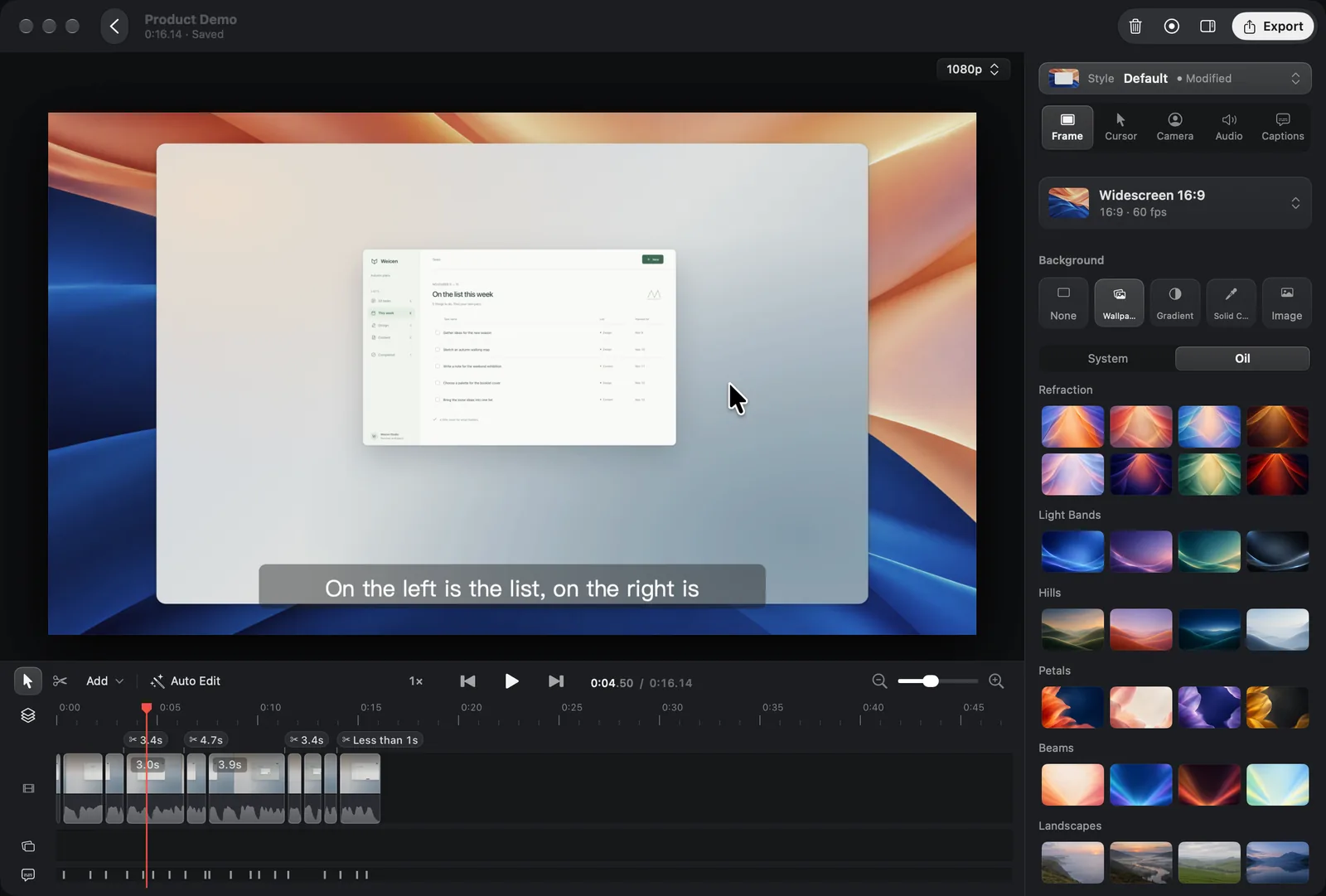
Native macOS 15 Oil Studio 1080p 60 fps zero-proxy canvas and multi-track timeline
Native macOS 15 capture: custom Swift + Metal compositor reading original footage at 60 fps with identical SDR sRGB color across preview, paused frames, and export.
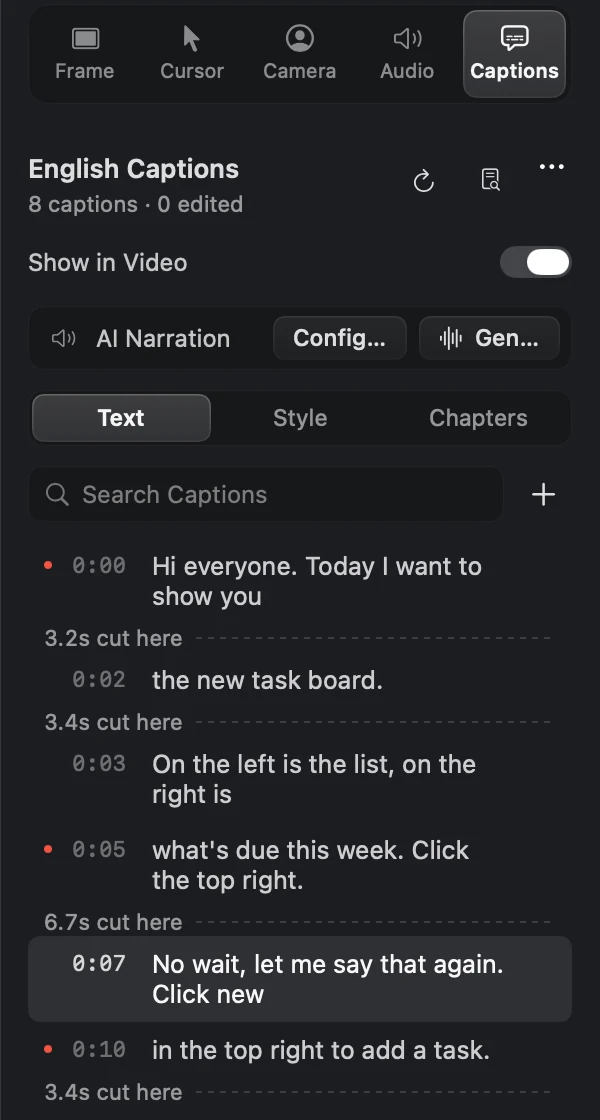
Native Oil Studio Captions inspector 1:1 capture showing word-timed transcript lines, trimmed pause markers, and Caption Narration
1:1 Captions inspector detail: select any retake sentence and press ⌘⌫ to cut matching footage, or synthesize caption-synced narration with your own API keys.
Interactive sandbox · No download

Try it live: delete a stumbled sentence and watch zoom blocks shift cleanly

Click the highlighted retake line or the “Cut footage” button on the bottom right to see timeline cuts and spring zoom blocks snap together automatically:

ListTextStyle
On-device · English
  1. 0:04This is the new task panel: lists on the left, this week's work on the right.
  2. 0:09Click New in the corner, uh, like, to add a task.
  3. 0:13Then type a name and hit sa, wait, let me say that again.
  4. 0:17Type a name, hit Save, and the task shows up in the list.
  5. 0:22Tick a task off and it moves to Done by itself.
3.6 s cut here
1 sentence · 3.6 sDelete caption only

Apple silicon architecture & buy-once specs

Platform: Apple silicon (M-series) · macOS 15+ · Native Swift + Metal
~5×
1080p60 hardware export speed

Hardware-accelerated H.264 / HEVC on M-series Macs (~1.5× at 4K60) to local MP4, GIF, and standalone SRT.

150 ms
Word-boundary breath margin

Offline Whisper anchors pause & filler cuts to word boundaries with automatic audio crossfades.

≤ 1 GB
15-minute editing memory budget

Zero Electron overhead — holds captions, waveforms, and filmstrips under 1 GB RAM throughout editing.

$0
Recurring AI or caption fees

One-time license includes offline Whisper transcription, voice enhancement, and the local oilstudio CLI.

Specification matrix

18-point billing, capture, transcript editing & automation matrix

✓ Built in / no renewal required◐ Conditional / different mechanism— Outside product scope

1. Billing model, Mac seats & export ownership

SpecificationOil StudioScreenCharm
Purchase model & renewal obligation
✓One-time purchase ($39 offer / $49 regular)
◐Subscription ($89/yr billed yearly, or $19/mo monthly)
3-year cumulative ownership cost
✓$39 offer / $49 regular ($0 in years 2–3)
◐$267 (at $89/yr published annual rate × 3 years)
Macs covered per license / plan
◐2 Apple silicon Macs (auto-releases after 30 inactive days)
✓Up to 3 Macs
Watermark-free export if billing stops
✓Permanent local 4K60 MP4 & GIF export after activation
—Requires an active subscription

2. Screen capture, auto-zoom & social framing

SpecificationOil StudioScreenCharm
Auto-zoom on clicks, smooth cursor & motion blur
✓Spring click zoom, cursor path smoothing & 180° shutter blur
✓Smart auto-zoom, cursor smoothing, click ripples & motion blur
Webcam background removal, blur & layouts
✓Frameless person cutout, background blur, skin smoothing & zoom dodge
✓Webcam background removal, floating bubble & edge-pinned layouts
Split 9:16 vertical social export & MacBook frames
—Focused on landscape & custom-region MP4 / GIF output
✓Built-in split 9:16 Reels/Shorts/TikTok export & MacBook device frames
Invisible voice-tracking teleprompter
✓Built-in floating teleprompter excluded from screen capture
—No built-in teleprompter
Modifier keystroke caps with Secure Input filtering
✓Shows only ⌘/⌃/⌥ combos & Esc; ignores macOS Secure Input passwords
—Click ripple highlights; no Secure Input-filtered keycap overlay

3. Captions, word-level cutting & audio mixing

SpecificationOil StudioScreenCharm
Automatic speech-to-text captions
✓Offline on-device Whisper with burned-in styles & standalone SRT export
✓Built-in speech-to-text auto-captions with visual style presets
Cut video footage by deleting words in transcript
✓Select words and press ⌘⌫ to cut footage & shift zoom blocks together
—Not supported; footage is trimmed manually on the timeline
One-click pause & filler cleanup with click guard
✓150 ms word-boundary Keep Breath + yellow warning when silent spans have clicks
◐Manual dead-air trimming & speed ramps on the timeline
Voice enhancement & automatic music ducking
✓Voice noise/leveling + multi-lane music with Lower While Speaking
◐One-click mic noise reduction + built-in background music
BYOK caption-synced AI narration (ElevenLabs / OpenRouter)
✓Synthesize speech locked to caption timing using your own API keys
—No built-in multi-provider BYOK caption narration

4. Privacy redaction, CLI automation & sharing

SpecificationOil StudioScreenCharm
Redaction stability across automatic camera zooms
✓Pixelates/blurs source pixels before zooms & agent OCR — zero drift
◐Resizable blur regions placed over sensitive areas
Local CLI & Claude Code / Codex Agent Skill
✓Built-in oilstudio CLI & MIT Skill for retake proposals and auto-recording
—No local command-line interface or external agent protocol
Read-only import of existing auto-zoom projects
✓Imports video tracks, cursor paths & zoom blocks without altering originals
—Proprietary project format only
1-click cloud share links vs. bilingual UI
◐Local MP4 / GIF / SRT files · Native English & Simplified Chinese UI
✓1-click shareable cloud player links · English UI
Try side by side

Test the difference on your own Mac in 3 steps

Both apps let you download and record without entering a card. Record a real 3-minute narrated walkthrough on your Mac and compare how fast you can clean up retakes, redact secrets, and export.

If you already have existing auto-zoom recording projects on disk, drop one into Oil Studio to test lossless read-only migration directly.

Balance scale weighing a solid one-time license keycap against recurring annual subscription receipts
1. Record a real narrated window walkthrough free

Capture a native macOS window with mic and system audio — no account required — and inspect the spring click zoom and smoothed cursor.

2. Run offline Whisper and cut a retake by text

Generate local captions, highlight a stumbled phrase, press ⌘⌫, and watch footage, audio, and zoom blocks tighten together.

3. Pay once only when you are ready to export

Unlock watermark-free 4K60 MP4 and GIF exports on 2 Macs with a single one-time license and zero annual renewals.

Editorial methodology

How we verify every claim on this page

This guide is published by the Oil Studio team. To make it genuinely useful as an engineering and buying reference rather than a one-sided pitch, we follow four strict rules:

Direct vendor pricing links:All 3-year TCO math uses published annual or one-time list prices from each vendor's official pricing page, linked inline so you can verify in one click.
1:1 Retina proof + live browser sandboxes:Every core Oil Studio workflow is shown with unretouched macOS 15 captures plus interactive demos you can test before downloading.
Explicit 'when NOT to pick us' callouts:We clearly flag Intel Macs, macOS 13–14, USB iOS recording, multi-guest podcasts, still screenshots, and hosted cloud links where other tools win.
Zero fabricated quotes or synthetic scores:We cite only verifiable architectural facts, hardware encoder baselines, and open-source CLI schemas.

Spot a vendor price or feature change? Email zhihuang.oiloil@gmail.com and we will verify and update this page within one business day.

Primary sources

Public pricing & specification sources

Verify every pricing figure and capability boundary directly against ScreenCharm’s live pages and Oil Studio’s technical documentation:

Common questions

Frequently asked questions

Is ScreenCharm a one-time purchase or a subscription in 2026?
As verified on screencharm.com in November 2026, ScreenCharm’s published plans are subscription-based at $19/month or $89/year (covering up to 3 Macs with cloud share links and updates). If you want a true one-time license with no recurring renewal, Oil Studio is $39 during Black Friday ($49 regular) paid once for 2 Macs.
Both apps generate captions — how does editing voice-overs differ?
ScreenCharm generates styled captions for viewers watching with sound off while trimming happens on the timeline. Oil Studio runs Whisper offline on your Mac and turns the transcript into the editor itself: select any words or sentences and press ⌘⌫ to cut the underlying video and shift downstream zoom blocks automatically.
Which tool should I pick for 9:16 vertical Reels, Shorts, or TikTok clips?
Pick ScreenCharm. Its built-in Split Vertical mode places your camera alongside a cursor-following crop of your screen specifically for 9:16 social feeds, whereas Oil Studio focuses on crisp landscape and custom-region MP4 and GIF production.
Can I try Oil Studio free before paying?
Yes. Download Oil Studio without an account or credit card and test recording, spring auto-zoom, offline Whisper transcription, word-level cuts, and the local AI Agent CLI with no day limit. You only enter a license key when exporting watermark-free video.

Download free to record and edit — pay once only when you export.

Test capture, spring zoom, and timeline editing free on Apple silicon. One license covers 2 Macs with $0 ongoing AI credit fees.