 Oil Studio
The screen recorder for YouTube and software tutorials on Mac.
Capture crisp Mac system audio and microphone on separate lanes, remove silent pauses and retakes automatically, edit video by transcript, and keep captions and YouTube chapters synced—all locally with no upload caps.

- 00:00Intro & final result
- 00:1700:24Project setup
- 00:4100:58Live coding walkthrough
- 01:0801:36Wrap-up & export
System + micClean dual-lane audio
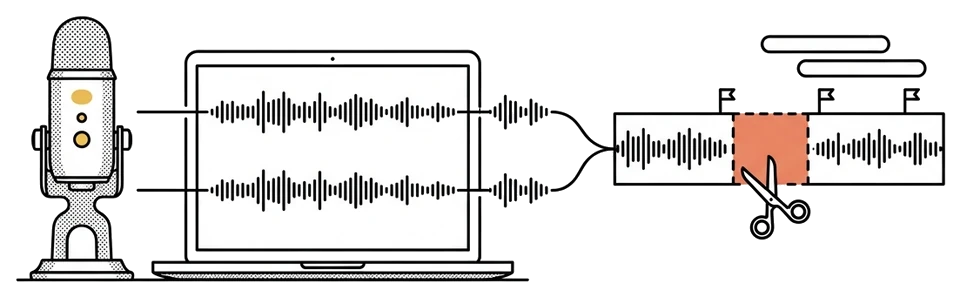
Record Mac system audio and microphone simultaneously with on-device voice enhancement and automatic music ducking.
Remove silenceTighten pauses in one click
Cut dead air and filler words on word boundaries while keeping 150 ms of natural breathing room so edits sound human.
Chapters & captionsSynced as you cut
On-device Whisper builds a word-level transcript. Delete a tangent and captions, zooms, and chapter timestamps shift automatically.
Turn a 30-minute coding walkthrough into a crisp tutorial in minutes.
Recording a tutorial is the easy part—scrubbing waveforms for silences, fixing flubbed lines, syncing captions, and recalculating YouTube chapter timestamps is what drains your week. Oil Studio keeps capture, audio polish, transcript cutting, and chapters in one local Mac app with zero cloud uploads.
- Record Mac sound with zero virtual drivers:Capture system audio, browser playback, and your voice on independent audio lanes—adjust levels anytime after recording.
- Built-in teleprompter & camera polish:Read your tutorial video script from a floating teleprompter hidden from capture, with optional background blur or cutout and soft skin smoothing.
- No length caps or upload queues:Projects stay on your Mac with zero-proxy 60 fps preview and a ≤ 1 GB memory budget on 15-minute timelines.
Finish talking, and the cut is done.
Oil Studio transcribes locally first, then cuts on word boundaries. Clear pauses and fillers in one click, or let your AI agent propose cuts for retakes and slips — zoom blocks follow and ⌘Z undoes in one step.
Cut the video by reading the transcript.
Select any sentence and press ⌘⌫ to cut video and captions together. Cuts snap to silence on word boundaries, never mid-word.
- Fillers grouped by word.“um” and “uh” clear by default; “like” and “so” stay unless you pick them.
- Captions follow every edit.Cut lines vanish and undo restores them with your edits, translations, and chapters.
- Use your own AI agent.Paste a prompt into Claude Code or Codex to review cuts back in the app — no account, no extra fee.
Captions, voice and camera, all on-device.
Recording, editing, Whisper, voice enhancement, skin smoothing, and avatars run on your Mac with zero upload. Cloud options are opt-in.

On-device captions
Local Whisper handles mixed languages and technical terms. Captions follow every cut; burn in or export SRT.
Voice and music
Removes room and keyboard noise, levels loudness (hold ⌥ to compare), and auto-ducks six built-in or custom tracks.


Skin smoothing and avatar
Smooths skin only, or swap in a reactive avatar that tracks your head, blinks, and speaks with you.
Teleprompter
Floats beside your camera, scrolls with your voice or by hand, and stays invisible in recordings.










Wallpapers and frame
56 original wallpapers or your Mac's own, with radius, padding, shadow, and blur in one panel.
Camera layouts
Switch corner, side-by-side, or full frame smoothly; the webcam shrinks out of the way during zooms.
Faster than OBS + NLE. Cheaper than cloud editors.
Skip virtual audio driver headaches and monthly transcription limits on long tutorials.
| Oil Studio | OBS + NLE / subscription cloud editors | |
|---|---|---|
| Price | $39 launch price ($39 vs. $49 regular, until Dec 1), one-time purchase | NLE + cloud transcription subscriptions often run $240–$360/year |
| Mac system audio + microphone | Native multi-lane capture out of the box, no virtual audio drivers | OBS requires third-party virtual audio routing on macOS |
| Remove silence from video | Word-boundary pause cleanup with 150 ms breath, ⌘Z undo anytime | Manual waveform slicing or paid silence-removal plugins |
| Edit by transcript | Built-in on-device Whisper; select text and press ⌘⌫ to cut | Cloud editors require uploading gigabytes and cap monthly hours |
| Voice enhancement & ducking | On-device voice enhancement with automatic music ducking while speaking | Manual EQ chains and keyframed volume envelopes |
| Long tutorial workflow | 100% local, no upload wait, ≤ 1 GB memory on 15-min timelines | Slow cloud uploads or heavy proxy generation |
Common questions.
01Can Oil Studio record screen with sound on Mac without extra audio drivers?
Yes. Enable both microphone and system audio in the recorder to capture your voice and any Mac app or browser sound on separate lanes—no virtual audio devices required.
02How do I remove silence from a tutorial video without sounding robotic?
Oil Studio uses on-device Whisper word timestamps to tighten pauses on word boundaries, leaving a default 150 ms breath so cuts stay natural instead of clipping syllables.
03Can I use a tutorial video script while recording my screen?
Yes. The built-in floating teleprompter scrolls smoothly near your camera and is automatically excluded from the recorded video.
04Do captions and YouTube chapter timestamps stay accurate if I cut a section later?
Yes. Because captions, zoom blocks, and chapter markers stay bound to the timeline, cutting a retake or tightening silences automatically shifts every timestamp to match the final export.
05Is there a recording length limit for long YouTube tutorials?
No. Everything is captured and edited locally on your Mac with native Swift and Metal, so you never hit cloud storage caps or monthly transcription hour limits.
Recording, editing and captions, together.
Launch price: $39 (regular $49, until Dec 1). One-time purchase.
- Spring auto-zoom on clicks, smoothed cursor, motion blur, and 4K 60 fps hardware export
- Offline on-device Whisper captions and word-level transcript cutting (audio stays local)
- Sensitive-region privacy redaction, keystroke overlays, voice enhancement, and teleprompter
- Built-in AI Agent CLI & open-source Skill for Claude Code and Codex automation
- Activates on 2 Apple silicon Macs per license (inactive devices auto-release after 30 days)
- No subscription, no media-hour caps, and $0 AI credit fees — keep exporting with no annual renewal
One-time purchase, no subscription or per-use fees. Try recording and editing free, then activate export. Works on 2 Macs; inactive devices auto-release after 30 days.